All product image guides Product size and scale photography

Give size a reference the buyer can trust.

An isolated image can make a miniature item look full size. A scale photograph connects a measured real product to a familiar reference or its actual use. A generated room or hand cannot establish that relationship.

Explore atmosphere after capturing scale Two free credits when you sign up. Review the result before publishing.
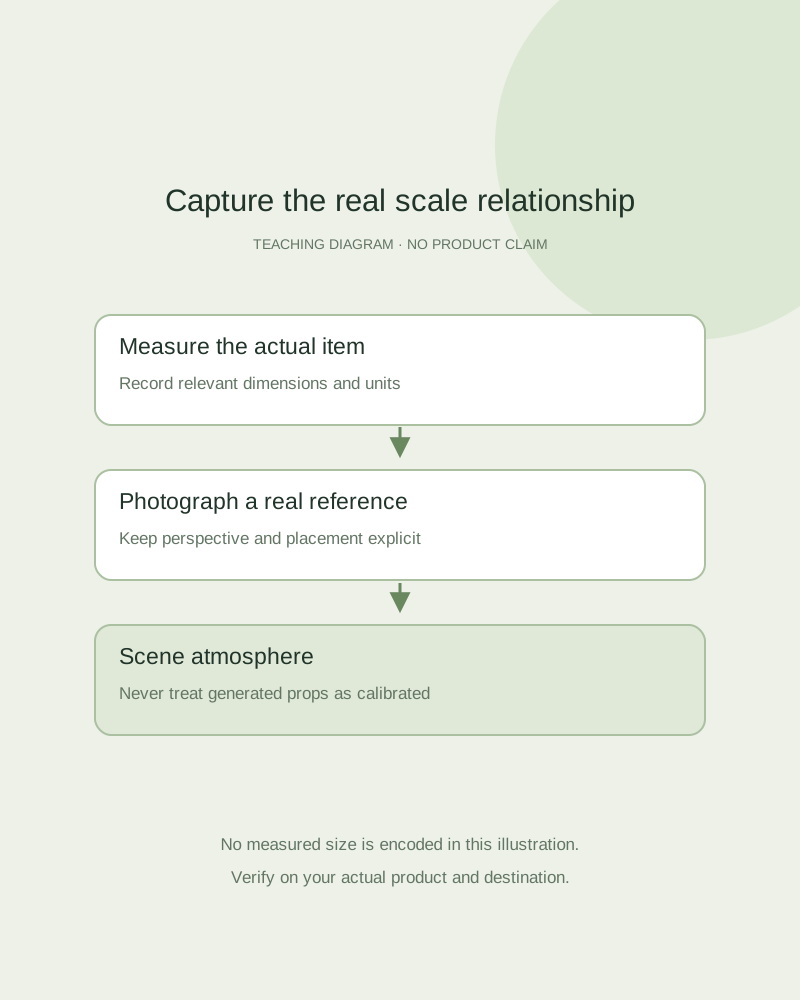
Teaching diagram separating a measured object, a known-size reference and a scene concept
EDITORIAL CONCEPT
01 / EXAMPLEILLUSTRATIVE CONCEPT
What this shows

Measurement and atmosphere are different evidence.

The drawing illustrates where real measurements belong in a product gallery. It does not measure an item, verify fit or simulate a physically correct scene.

Teaching diagram separating a measured object, a known-size reference and a scene concept
Editorial conceptOriginal teaching diagram, not a product photograph, Fayvoro generation or customer result. All lines are schematic; the drawing has no calibrated scale or measured product dimensions.

This image is an editorial concept made for the site. It is not a Fayvoro generation or customer result. AI can change product shape, color, packaging, labels, and text. Check every important detail against the real item.

02 / A PRACTICAL WORKFLOWSTART WITH YOUR PHOTO
01

Identify the size question

Ask what the shopper needs to decide: fit on a shelf, hand-held size, usable opening or worn proportion. Record the exact dimensions relevant to that question, including whether the measurement covers packaging or the product itself. Volume, mass and exterior length answer different questions.

Select a reference appropriate to the use. A real item on its intended desk can provide context; a ruler can provide a more specific dimension. Baymard’s product-page research supports giving shoppers an in-scale view. It is not evidence that a generated context will be physically accurate.

Furniture dimensions and useful openings — Link measurements to the correct furniture parts instead of treating a room image as a fit check.

Fabric Pattern Product Photography — Show fabric repeat, motif scale, selvage and drape with factual photographs. Keep an illustrative styling scene separate from exact print and color evidence.

Woven Basket Product Photography — Show a woven basket’s actual opening, handles, base and handmade variation.

Plush Toy Product Photography — Photograph a plush toy’s actual face, limb arrangement, seams and stated size basis.

Plan laptop sleeve product photographs — Photograph laptop sleeve openings, actual interior measurements, lining and pocket contents. Keep styling apart from verified device fit and protection claims.

02

Capture the real relationship

Place the real product and reference in a clearly visible arrangement. Avoid a near-camera prop that makes the product look unusually small. Keep the important dimension in a comparable plane, then photograph a second view if depth or opening size cannot be understood from the first.

For worn fit, use a real model and record the relevant garment size or product dimensions alongside the image. A rendered person is not a verified body reference. Keep the source photo and measurements available so an approver can identify which physical item was photographed.

Photograph garment measurements — Link a real measurement to its named points and retain the tagged size separately.

Rug Product Photography — Show rug pattern, pile direction, finished edges and actual backing. Plan a room scene while retaining real dimensions, texture and included-system evidence.

Cutting Board Product Photography — Show the actual cutting board grain, thickness, grooves, handles and underside.

Picture Frame Product Photography — Show the real picture frame profile, opening, mount and rear hardware.

03

Publish dimensions outside the generated scene

Add verified units and a concise dimension explanation in the product information or a carefully prepared measurement graphic. Inspect the mobile version so a small annotation remains readable. Where the platform limits overlays, use the allowed secondary image or product specifications instead.

Fayvoro does not take measurement inputs or preserve a calibrated relationship between a product and generated props. Use a scene for atmosphere only after reviewing the product. Keep the real scale photo in the gallery, and do not describe a generated hand, shelf or coin as a tested size reference.

Enamel Pin Product Photography — Plan enamel pin photos that show the front artwork, actual post layout, included clutch and finish.

Plant Product Photography — Show the actual plant or clearly labeled representative stock, nursery pot, foliage and measured height. Keep a room concept separate from growth and sale evidence.

Cushion Cover Product Photography — Show the actual cushion cover, zipper, front and reverse, then identify any separate insert used for styling.

Plan necklace product photographs — Plan necklace photographs showing the full chain, actual clasp, extender and pendant reverse. Keep chain measurements and real worn placement separate from styled imagery.

Practical decision card

Match the reference to the size question

Use verified measurements and real photographs. The reference must answer the buyer’s particular question.

Manual planning and review; no automatic product inspection.
Buyer questionUseful real evidenceWhat a scene cannot establish
Will it fit on the shelf?Measured exterior dimensions and a real placementPhysical clearance from a generated room.
How large is it in a hand?Actual object held in a real hand, with dimensionsWorn or hand-held proportion from an invented person.
How wide is the opening?Measured opening and a direct real viewUnseen interior geometry from a front image.
Does it hold the stated volume?Verified capacity specification or measurementVolume from the exterior silhouette alone.
Do not use this drawing or table as a calibrated reference. Keep units and the exact measured item with the evidence.
Direction to try

A useful starting note.

Use this as a starting point, then adjust it for your own product. No prompt can guarantee exact product details.

Create one atmospheric secondary scene from my real product reference on a simple surface. Avoid people, rulers or comparison objects that imply measured size. I will use separate real photographs and verified dimensions for scale and fit.
Before you publish

Check the details.

  • The buyer’s actual size or fit question is identified.
  • Product dimensions and units are verified independently.
  • A real reference photograph avoids misleading perspective.
  • Generated context is not presented as calibrated scale or fit.
Common questions

A few things to know.

Can I calculate dimensions from a Fayvoro result?

No. The generated image is not calibrated and does not establish physical measurements.

Will a familiar prop always show size correctly?

No. Its real size, position and perspective matter. Photograph the actual relationship and keep measured specifications.

Is a text-only concept a valid size photo?

No. It depicts an imagined object. Use real inventory and verified measurements for a buying decision.

Make your image
with intention.

Explore atmosphere after capturing scale