All product image guides Product photo color accuracy

Find the color shift before correcting the variant.

Color changes can enter at capture, editing, export or display. Compare one actual stocked variant through those stages, keeping the lighting reference and original file available.

Explore one secondary product scene Two free credits when you sign up. Review the result before publishing.
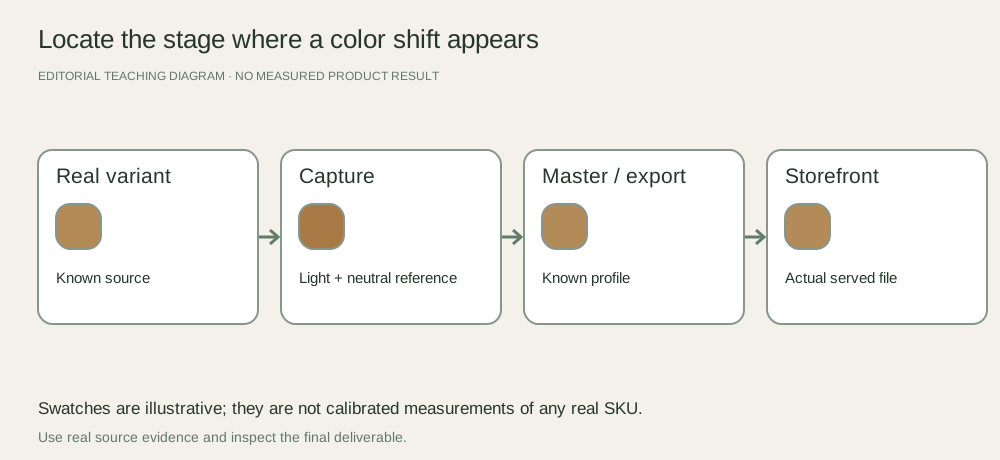
A color review chain from the real variant through lighting and white balance, edited master, exported file and storefront display, with a check at each stage
EDITORIAL CONCEPT
01 / EXAMPLEILLUSTRATIVE CONCEPT
What this shows

One variant, several possible causes.

The teaching diagram maps a review workflow. The colored swatches are illustrative, not calibrated measurements of a real product.

A color review chain from the real variant through lighting and white balance, edited master, exported file and storefront display, with a check at each stage
Editorial conceptOriginal teaching diagram. It is not a generated product image, a customer example, or a measured test result.

This image is an editorial concept made for the site. It is not a Fayvoro generation or customer result. AI can change product shape, color, packaging, labels, and text. Check every important detail against the real item.

02 / A PRACTICAL WORKFLOWSTART WITH YOUR PHOTO
01

Make a comparable real capture

Use the actual variant, not a recolored photo of another SKU. Record the light sources and take a reference frame under the same illumination. Mixing window light and a warm room lamp can make different parts of the item shift differently; a single overall slider may not correct both.

Adobe’s white-balance guidance describes a gray-card reference and consistent illumination as useful controls. Follow your camera and reference-card instructions. Keep the reference frame and product frame together, and repeat the reference when lighting changes. A neutral balance still does not certify every saturated fabric or metallic finish.

Photograph ceramic glaze variation — Keep the specific piece and its genuine glaze range tied to the listing.

Fabric Pattern Product Photography — Show fabric repeat, motif scale, selvage and drape with factual photographs. Keep an illustrative styling scene separate from exact print and color evidence.

Towel Product Photography — Plan bath towel photographs with real loop texture, border, size and supplied count. Keep stacked bathroom scenes separate from absorbency and fabric-weight claims.

02

Locate the stage where the mismatch appears

Compare the physical item under suitable review light with the master on a profiled display where available. Then compare the editor preview, exported file and served storefront image on that same system. If the master agrees but the export shifts, inspect its profile and export settings before altering the product pixels.

If only one phone looks different, investigate display modes and viewing conditions before changing the catalog for that phone. Record which stage and device showed the mismatch. Do not force all variants toward one pleasing color grade if it erases genuine differences.

Photograph the physical art print — A digital artwork preview and a real manufactured sample provide different color evidence.

Rug Product Photography — Show rug pattern, pile direction, finished edges and actual backing. Plan a room scene while retaining real dimensions, texture and included-system evidence.

Plan eyeshadow palette product photographs — Plan eyeshadow palette product images with the real pan order, packaging and separate truthful swatch photos. Use AI scene exploration without treating generated color as performance evidence.

03

Separate mood from variant evidence

A warm campaign setting may be intentional while the factual variant gallery remains neutral. Give each asset a role and keep the real color reference visible to the reviewer. Ask the product owner to approve the exact variant representation, especially when neighboring shades are easy to confuse.

Fayvoro is not a calibrated color-matching or variant-recoloring service. Generated lighting can change the apparent product hue. Keep an accurate real photo for selection and comparison; use a secondary generated scene only after checking that it does not misrepresent the sold color.

Document real leather patina — Separate natural material variation from damage and a digitally smoothed surface.

Yarn Product Photography — Photograph yarn colorways, actual dye-lot labels, skein texture and a separate real knitted swatch.

Plan nail polish product photographs — Plan nail polish images with the exact bottle label, brush and separate real swatches. Record application conditions and keep generated manicure scenes out of color evidence.

Practical decision worksheet

Locate the stage of the color mismatch

Record the actual reference and viewing system; these checks do not calibrate a camera or display.

Need or findingNext actionEvidence to check
Different casts across the productCheck mixed light sources and make a controlled reference capture.The product and reference were photographed under the same light.
Master already differs from the variantReview capture, white balance and product evidence.The correct real variant was photographed.
Master agrees but export differsInspect known profiles and the export workflow.The exact exported revision is compared on the same system.
Only one phone differsCheck display mode and viewing conditions before altering the catalog.The finding is tied to a device and stage rather than guessed.

Use the worksheet in your existing capture, editing or storefront workflow. Fayvoro’s scene studio is a separate optional step and does not perform the editing or platform actions described here.

Direction to try

A useful starting note.

Use this as a starting point, then adjust it for your own product. No prompt can guarantee exact product details.

Use a clear photo of this actual stocked variant for one restrained secondary scene. Keep dramatic color casts away from the product. I will compare the result with my real capture and keep the factual variant image in the gallery.
Before you publish

Check the details.

  • The photographed item is the actual stocked variant.
  • Illumination and the white-balance reference are recorded.
  • Master, export and served image are compared on a known review system.
  • Atmospheric color styling does not replace truthful variant evidence.
Common questions

A few things to know.

Does a gray card prove exact product color?

No. It helps establish a neutral reference under that light. Product materials, profiles, displays and viewing conditions still need review.

Should I generate every color from one photo?

A generated recolor does not establish the appearance of a stocked variant. Photograph the actual options when shoppers need factual color evidence.

How does this differ from sRGB export?

This guide diagnoses capture and product-reference accuracy. The sRGB guide covers preparing an approved master for web delivery.

Make your image
with intention.

Explore one secondary product scene