02 / A PRACTICAL WORKFLOWSTART WITH YOUR PHOTO
01Start with a known master profile
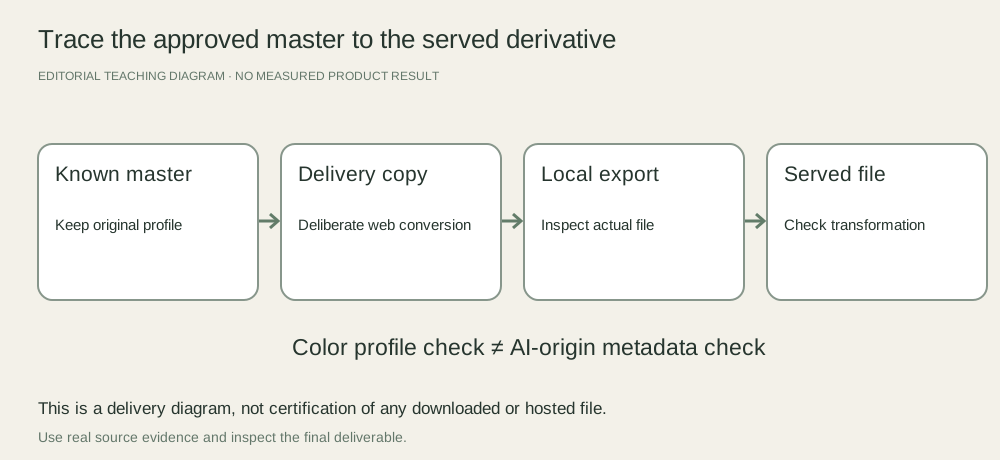
Ask the editor or photographer which profile belongs to the master and preserve that original. If a file has no embedded profile, do not guess its origin based on the extension. Resolve the profile with the person who prepared it, and record that uncertainty if it remains unknown.
Adobe documents profile warnings and policies for opening images. Use a deliberate workflow instead of silently discarding a mismatch. Assigning an interpretation to existing pixel values and converting between known color spaces are different operations; use the appropriate one with a knowledgeable editor.
Make a web copy without overwriting the master
Adobe recommends sRGB for images prepared for online viewing. In an appropriate editor, convert a known master to the intended web space and inspect the preview. Save a delivery copy with its intended profile where the export supports it. Keep profile conversion separate from changing saturation to make the image more appealing.
Record filename, format, dimensions and the export decision. A white-balance correction belongs earlier in the capture and product-color workflow. Do not use web conversion to excuse a real variant mismatch. A print recipient may require a different workflow, so confirm their requirements separately.
Inspect the delivery path, not just the local export
Open the exported copy, then review the storefront’s served image on the same known system. A hosting transformation can change the delivered format or metadata. Keep evidence of which file and variant were checked rather than claiming every future transformation will behave the same way.
Color profiles and AI-origin metadata serve different purposes. A conversion to sRGB does not verify a destination’s AI disclosure or embedded-origin requirement. Fayvoro’s file profile and metadata are not certified by this worksheet; inspect any downloaded candidate and its final hosted derivative before using it in a workflow with those requirements.