All product image guides Product variant image mapping

Make the selected option show the right item.

A swatch, image and cart can each show a different variant when the mapping is incomplete. Establish a small source-of-truth table, assign real images deliberately, and test the complete purchase path before adding scene candidates.

Explore a scene from one real variant Two free credits when you sign up. Review the result before publishing.
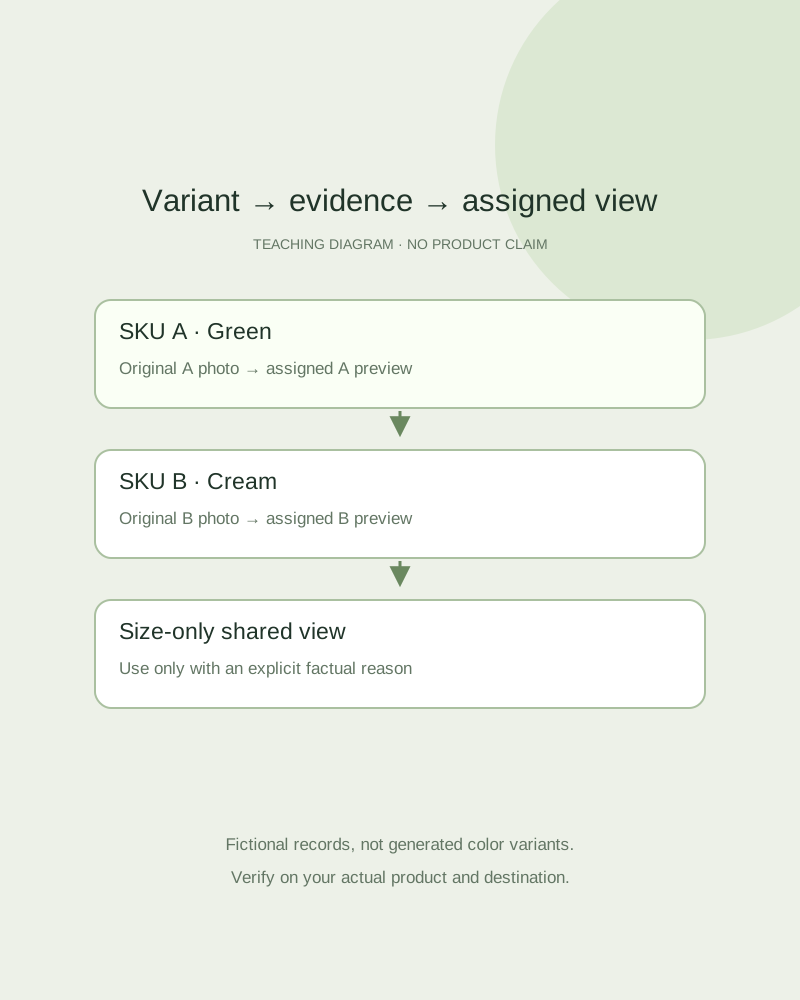
Teaching diagram connecting three named options to separate real-photo records
EDITORIAL CONCEPT
01 / EXAMPLEILLUSTRATIVE CONCEPT
What this shows

One variant needs its own evidence.

The diagram separates option identity from the image attached to it. It does not demonstrate a Shopify integration or an automatic variant check. Use actual product identifiers in your own record.

Teaching diagram connecting three named options to separate real-photo records
Editorial conceptOriginal teaching diagram, not a product photograph, Fayvoro generation or customer result. Colored cards are fictional option records; they are not generated product colorways.

This image is an editorial concept made for the site. It is not a Fayvoro generation or customer result. AI can change product shape, color, packaging, labels, and text. Check every important detail against the real item.

02 / A PRACTICAL WORKFLOWSTART WITH YOUR PHOTO
01

Map identities before uploading

Create one row per sellable variant: product identifier, SKU, option values, original photo filename, assigned preview and supplementary detail photos. Record an explicit shared-image reason when two sizes legitimately look the same. An unfilled row is an unresolved mapping, not permission to reuse the nearest color.

Photograph each visible color or finish that is actually stocked. Do not generate a blue version of a red item and assume it establishes the blue SKU. Keep dimensions and availability in product data rather than asking an image to describe every option.

Food packaging variants and revisions — Match each flavor, size and artwork revision to its genuine consumer-pack source.

Sunglasses Product Photography — Plan sunglasses photos with readable lens tint, front shape, folded temples and actual frame markings.

Plan phone case product photographs — Plan phone case photos that show the exact model, camera opening, side controls, charging cutout and inside surface. Keep compatibility claims tied to verified specifications.

02

Distinguish assignment from gallery membership

Shopify currently allows one assigned image per variant. Additional images can remain in the product media gallery. Merely uploading five photographs does not attach each one to its option or guarantee that the theme filters the gallery when an option changes.

Use your current admin and theme behavior to decide how supplementary views appear. Keep a default view for direct product visits, then document whether unselected-variant images remain visible. A store-specific app or theme feature may be required for a different gallery behavior; Fayvoro does not provide it.

Show pet-accessory fit details — Record the actual width, closure, size option and supplied pieces before scene exploration.

Board Game Product Photography — Plan board game photographs for the actual edition, box and included components. Keep staged play scenes separate from complete-set and condition evidence.

03

Test a variant round trip

On the actual storefront, select each option and compare the label, preview, product data and add-to-cart result. Open a direct variant URL in a fresh session and repeat. Test a sold-out combination as well as the default one; the wrong image can survive a disabled selection.

Use a new scene only after its physical details match that particular source variant. Attach it as an additional reviewed image with an explicit role. If the generation changes the shade, closure or quantity, keep the accurate original and fix the mapping without publishing that candidate.

Notebook Product Photography — Plan notebook and stationery photographs that show the selected layout, binding, cover and actual writing evidence. Try a separate desk scene from a real product photo.

Perfume Bottle Product Photography — Photograph the selected perfume bottle size, cap, real atomizer and included box.

Practical decision card

Audit the option round trip

Use this record for each real variant. These are review stages, not Shopify features supplied by Fayvoro.

Manual planning and review; no automatic product inspection.
StageRecord or observeResolve when it differs
Source recordSKU, actual option values and original photoCapture the missing real variant; do not infer its color.
Assigned previewThe exact image attached to this optionChange the assignment, not merely the media order.
Storefront selectionSelected label, visible image and availabilityCheck the theme’s actual option and gallery behavior.
Purchase and direct linkCart variant and fresh-session variant URLHold the image assignment until item and purchase agree.
A shared-size photograph needs a documented reason. A scene candidate never supplies missing evidence of another finish.

Keep the remaining stage unverified. This records your own observations; it does not inspect or save a store.

Direction to try

A useful starting note.

Use this as a starting point, then adjust it for your own product. No prompt can guarantee exact product details.

Use my photo of this exact stocked variant as the reference for one secondary scene. Keep the whole item visible on a plain surface. Do not recolor it, add accessories or invent text. I will verify the result against this variant before assigning it in my store.
Before you publish

Check the details.

  • Each sellable option has a source photo or an explicit shared-view reason.
  • The assigned preview differs from mere gallery membership.
  • Option label, image, direct link and cart agree on the variant.
  • Any scene candidate is reviewed against the exact source SKU.
Common questions

A few things to know.

Can Fayvoro assign my Shopify variant images?

No. Fayvoro creates a scene candidate. Assign and test the image in your own store admin and theme.

Can I create missing color photos by recoloring one source?

A generated color is not evidence of a stocked variant. Capture the real finish and review its actual appearance.

Why test the cart if the image changes correctly?

The selected image and purchase option can be separate behaviors. Check both so the pictured item agrees with what is ordered.

Make your image
with intention.

Explore a scene from one real variant