All product image guides Pet accessory product photography

Make the collar's construction easy to inspect.

A colorful collar picture may hide the buckle, adjustment hardware or width that makes one option different from another. Show the accessory on its own first, then keep any scene concept separate from actual sizing and performance information.

Explore one scene from your accessory photo Two free credits when you sign up. Review the result before publishing.
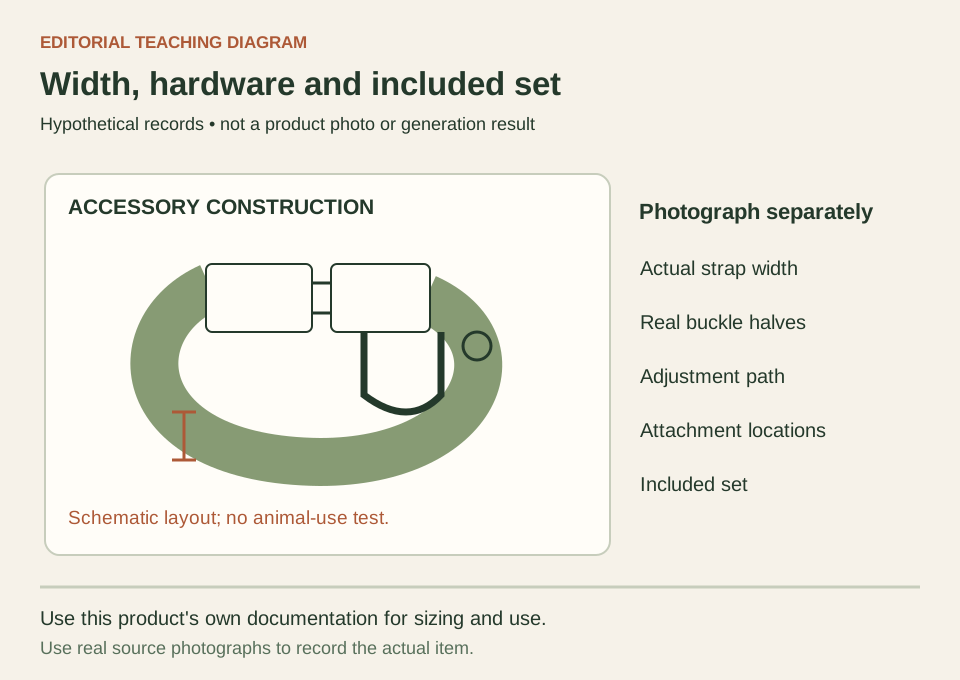
Teaching diagram of a fictional collar showing the strap width, buckle, adjustment section and separate attachment locations
EDITORIAL CONCEPT
01 / EXAMPLEILLUSTRATIVE CONCEPT
What this shows

Different parts deserve distinct views.

This diagram names construction areas a buyer may need to inspect. It does not endorse a collar design or show an animal wearing it. Photograph the actual hardware and consult that product's own documented sizing and use information.

Teaching diagram of a fictional collar showing the strap width, buckle, adjustment section and separate attachment locations
Editorial conceptOriginal teaching diagram, not a product photograph, Fayvoro generation or customer result. The collar is schematic. It makes no strength, breakaway, fit or animal-use claim and contains no real measurements.

This image is an editorial concept made for the site. It is not a Fayvoro generation or customer result. AI can change product shape, color, packaging, labels, and text. Check every important detail against the real item.

02 / A PRACTICAL WORKFLOWSTART WITH YOUR PHOTO
01

Identify the exact option and what is included

Start with the item identifier, selected color or pattern, material information supplied by the maker, and the exact size option. Separate an adjustment range from the strap's width; they are different dimensions. List the collar, tag, leash, bow or other pieces as included or excluded before arranging them. A matching accessory placed beside the collar can easily look like part of the purchase if its role is not made clear.

Ruffwear's own Front Range collar page provides separate neck-range and webbing-width information, and identifies its buckle and attachment features. This is an example of maker-specific product documentation, not a sizing standard for your collar. Photograph and document your actual option. Do not borrow another brand's fit table, infer a material from its appearance, or assume that a similar-looking ring has the same intended use.

  • Keep adjustment range and strap width in separate product-data fields.
  • Photograph only the selected option and clearly distinguish included pieces from props.

Plan pet bowl product photographs — Plan pet bowl photos with an empty interior, actual base, capacity record and separately labeled inserts. Keep styled feeding scenes apart from real behavior and safety evidence.

02

Show adjustment and hardware without hidden construction

Make one complete accessory view with the strap arranged so its shape is understandable. Add closer views of the buckle, adjuster, stitching and relevant attachment locations. When showing a buckle open and closed, use the real item in both frames and keep the surrounding strap visible so the buyer can connect them. Take a factual width photograph with a ruler if that dimension needs visual explanation, preserving readable units and endpoints.

Use soft light that makes dark webbing and small metal parts readable without covering them with props. Inspect the exported image for an obscured adjustment path or a cropped closure. A photograph can show current construction and appearance, but it does not test strength, breakaway behavior, durability or suitability for an individual animal. Keep any such product claim tied to the maker's actual information and appropriate evidence, not an image's convincing look.

03

Make a concept that does not invent an animal-use claim

Choose a clear rights-cleared photo of the actual accessory for one Fayvoro scene attempt. Request a plain surface and enough separation to see the whole strap and hardware. Avoid asking the generator to place the product on an animal when fit and attachment accuracy are important. One source image guides one attempt; Fayvoro does not measure necks, test a closure or verify that the generated attachment works.

Compare the candidate against the source for strap width, pattern, buckle halves, stitching, adjuster position and attachment count. Check for a fused ring, imaginary clip or duplicate collar. Reject changed construction and keep the factual detail views. A pet shown comfortably in a generated scene would not prove sizing or safe use. A quiet accessory-only composition can explore visual direction without implying that the product has passed a use test.

Direction to try

A useful starting note.

Use this as a starting point, then adjust it for your own product. No prompt can guarantee exact product details.

Use my uploaded photo of this exact pet accessory as the reference for one secondary scene on a neutral surface. Keep the complete strap, buckle and attachment hardware clearly visible with soft light. Do not add an animal, leash, tag, clip, matching product or new attachment. I will compare width, pattern and construction with the factual source; this is not a fit or strength test.
Before you publish

Check the details.

  • Size option, adjustment range and actual width are recorded separately.
  • Buckle, adjuster, stitching and attachment locations match real detail views.
  • Included and excluded matching items cannot be mistaken for one bundle.
  • Generated construction does not add, fuse or omit hardware.
  • Sizing and performance statements come from actual product information, not the scene.
Common questions

A few things to know.

Can a dog shown wearing the collar establish its size?

No. A scene cannot measure an animal or establish the accessory's correct adjustment. Use the actual maker's sizing information and real measurements where appropriate. A generated wearing image is not a fit test.

Should a leash ring and an ID attachment look interchangeable?

Show the actual product's attachment locations and documented roles. Do not treat similar shapes as equivalent or let a generated image merge them. If the intended role is unclear, resolve it from the maker's information before publishing.

Can I show a matching leash that is sold separately?

Where the channel permits contextual accessories, identify its excluded status clearly. Keep an accessory-only image and an accurate included-items record. Do not rely on a buyer inferring that the matching piece costs extra.

Make your image
with intention.

Explore one scene from your accessory photo