All product image guides Board Game Product Photography

Show which edition and which pieces the buyer receives.

A board game box can resemble another edition while its pieces and artwork differ. Photograph the actual box and contents together as a record, then make a separate tabletop scene for presentation. A staged game is not a complete inventory check.

Explore a scene from your real photo Two free credits when you sign up. Review the result before publishing.
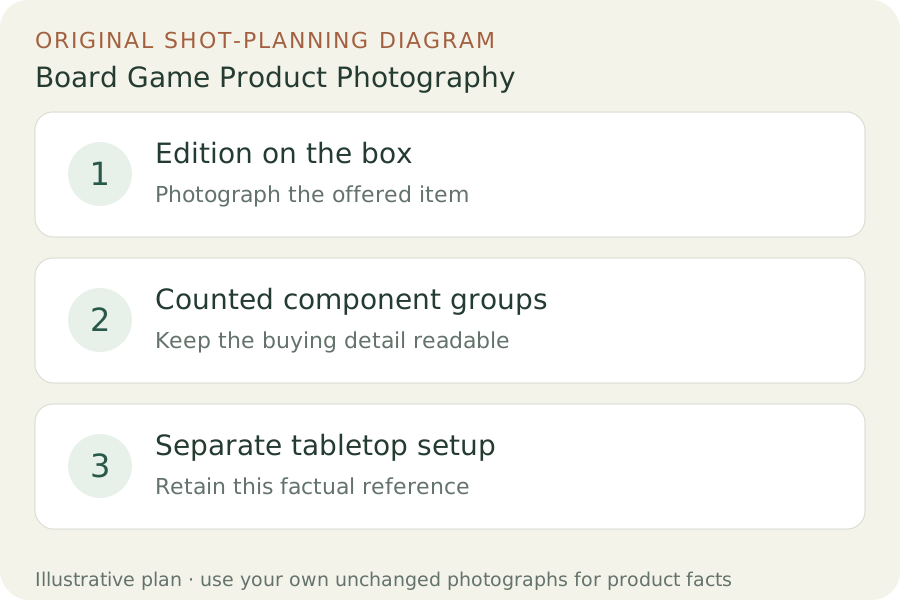
Original teaching diagram: Edition on the box, Counted component groups, Separate tabletop setup
EDITORIAL CONCEPT
01 / EXAMPLEILLUSTRATIVE CONCEPT
What this shows

Give each photograph one clear job.

Use the three labeled views to plan your factual gallery. The outlines show composition roles only; they contain no observed dimensions, verified materials or performance measurements. Keep real photographs beside any secondary scene candidate.

Original teaching diagram: Edition on the box, Counted component groups, Separate tabletop setup
Editorial conceptOriginal teaching diagram for shot planning. Illustrative outlines, not a photograph of inventory, a Fayvoro output or a customer example.

This image is an editorial concept made for the site. It is not a Fayvoro generation or customer result. AI can change product shape, color, packaging, labels, and text. Check every important detail against the real item.

02 / A PRACTICAL WORKFLOWSTART WITH YOUR PHOTO
01

Anchor every frame to the actual edition

Record the title, language, edition and sale condition before opening the shot list. Photograph the real front, back and edition information on the box. Do not use the cover of a newer release to advertise a used copy from an older printing. Keep a separate identifier frame when the visible title alone leaves room for confusion.

CATAN documents compatibility differences between editions and components. That supports a practical listing rule: identify the game you actually have rather than assuming visually similar pieces are interchangeable. For your item, use its own packing list or documented contents to build the inventory. Expansion pieces, upgraded tokens and sleeves should have a clear included or excluded status.

02

Make an inventory photograph a different job from a play scene

Lay out counted component groups in an uncluttered overhead frame. Keep stacks low enough to see the grouping, and add real close-ups when small pieces would disappear at normal listing size. State the counted contents in text; the buyer should not have to count a dense tabletop photograph to discover whether a set is complete.

For a used game, photograph actual box corners, board folds, card wear and any missing or replaced pieces. Then build a separate play arrangement with enough context to recognize the game. Label that frame as a setup view. Do not let decorative dice or borrowed tokens enter the sale set by implication, and do not arrange a sealed game as if you had inspected its unseen contents.

03

Explore a tabletop backdrop without inventing a complete game

A Fayvoro attempt can start from one real product photograph to explore a secondary tabletop composition. Choose a source that already shows the visible box or grouped objects you want retained. Keep all factual component and condition images separate. This page does not claim exact preservation of complex printed game art or multi-object reconstruction.

Review card artwork, board layout, visible piece counts, dice markings and box text. If details change, do not use the candidate as inventory or gameplay evidence. A convincing imagined position cannot show that every piece is present or that an expansion fits your edition. When accuracy is hard to review, the real setup photograph is the stronger gallery image.
Direction to try

A useful starting note.

Use this as a starting point, then adjust it for your own product. No prompt can guarantee exact product details.

Use my real board game photograph for one quiet tabletop display scene. Keep the visible game box and supplied pieces unobstructed, with soft room light. Add no cards, dice, tokens or printed rules. I will compare every visible component and all artwork; this is not a completeness or compatibility record.
Before you publish

Check the details.

  • Box title, language and edition match the offered copy.
  • Included components are counted from the actual packing list.
  • Expansions and borrowed styling pieces have explicit status.
  • Used-item wear stays visible in unchanged condition views.
  • A generated setup is never used as a completeness certificate.
Common questions

A few things to know.

Can a tabletop image prove that a used game is complete?

No. Check and state the actual inventory, using the relevant contents list. A scene can hide missing pieces or invent new ones.

Should I open a sealed game for the listing photo?

Describe and photograph the real sale condition. Do not imply that sealed contents were inspected. Use clearly identified manufacturer information only where you have rights and it matches that edition.

Can generated pieces show expansion compatibility?

No. Confirm compatibility in the game publisher’s documentation for the exact editions. Invented pieces or familiar artwork cannot establish it.

Make your image
with intention.

Explore a scene from your real photo