PRODUCT STORIES / A CREATIVE GUIDE

TikTok Shop Product Images

Let the listing image describe the item that will ship.

A TikTok video frame, an attractive AI scene and a product detail image can describe different things. Build the listing from real item evidence, then decide whether any additional scene accurately represents that same SKU.

Sign up for 3 free credits · Your starting direction is included.See the example
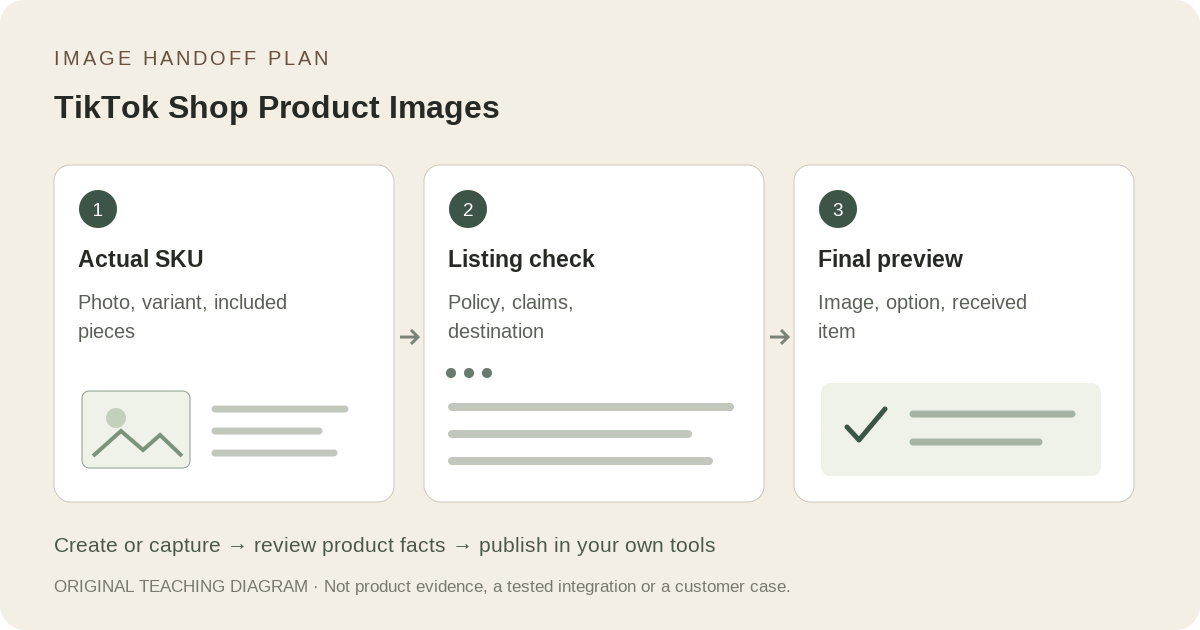
Original illustrative workflow: Actual SKU, Listing check, Final preview
EDITORIAL CONCEPT
01 / EXAMPLEILLUSTRATIVE CONCEPT
What this shows

Give each image a specific delivery job.

This illustrative workflow separates image creation from the checks and publishing steps you complete in your own tools. The sequence is a planning aid, not a tested integration or evidence of listing approval.

Original illustrative workflow: Actual SKU, Listing check, Final preview
Editorial conceptOriginal teaching diagram, not a product photograph, Fayvoro result, platform screenshot or customer case.

This image is an editorial concept made for the site. It is not a Fayvoro generation or customer result. AI can change product shape, color, packaging, labels, and text. Check every important detail against the real item.

YOUR STARTING IDEA

Take the direction. Make it your own.

Use this uploaded item as the reference for a quiet product-only studio scene. Show the entire outline and the actual included count. Do not add text, badges, claims, QR codes, links or new accessories.
Add your reference photo in the studio, then adjust the direction.
Before you publish

Compare the result with your real product and your destination’s requirements.

  • Selected option and photographed SKU agree.
  • Included quantity, labels and physical features match the actual item.
  • No redirect, unauthorized badge or unsupported performance claim was added.
  • Current market and category rules were checked in Seller Center.
02 / A PRACTICAL WORKFLOWSTART WITH YOUR PHOTO
01

Start with a listing evidence set

Assign a real image to the complete item, a different view to the relevant construction, and a real close-up to labels or included parts. For variations, record the exact option represented by each file before editing anything. A scene that changes the closure or supplied count should fail your own review.

  • Example: a phone case needs the selected model cutouts, not a generic phone silhouette.
  • Record source photo, variant identifier, approved file and the reviewer in one row.
02

Check US policy separately from creative direction

The US Product Listing Policy requires accurate, consistent listing content and prohibits off-platform redirects and unsupported product claims. Do not embed a QR code, promotional badge or invented certification in an image. AI visuals still need to match the product the customer receives; a photorealistic appearance does not establish that match.

03

Give Fayvoro only an eligible supporting image job

Fayvoro can explore a new setting from one uploaded photograph. It does not publish to TikTok Shop, verify policy approval or keep every label and product pixel fixed. If a source label or shape changes, preserve the real photograph for that factual role and reject the scene for the listing.

04

Preview the selected variant before submission

Open the finished listing preview and select each option you edited. Compare its name, image, quantity and included accessories. Keep the submitted file and the date of the policy you checked, so a later rejection can be investigated against the actual image rather than a newer draft.

Common questions

A few things to know.

Does Fayvoro connect to TikTok Shop?

No. Create and review the image here, then complete listing upload and policy checks in your own seller tools.

Does an AI scene guarantee listing approval?

No. You remain responsible for product accuracy and the current market and category policies. Use real photographs when a scene changes essential facts.

Is this a TikTok video generator?

No. This workflow covers still images. The current studio does not generate a listing video.

Make your image with intention.