All product image guides Product photography focus stacking

Capture every needed focus plane from the real item.

When one real exposure cannot keep required details sharp, focus stacking can combine source frames focused at different depths. The merge needs stable capture and a detailed review; extra sharpness is not evidence of unseen construction.

Explore one secondary product scene Two free credits when you sign up. Review the result before publishing.
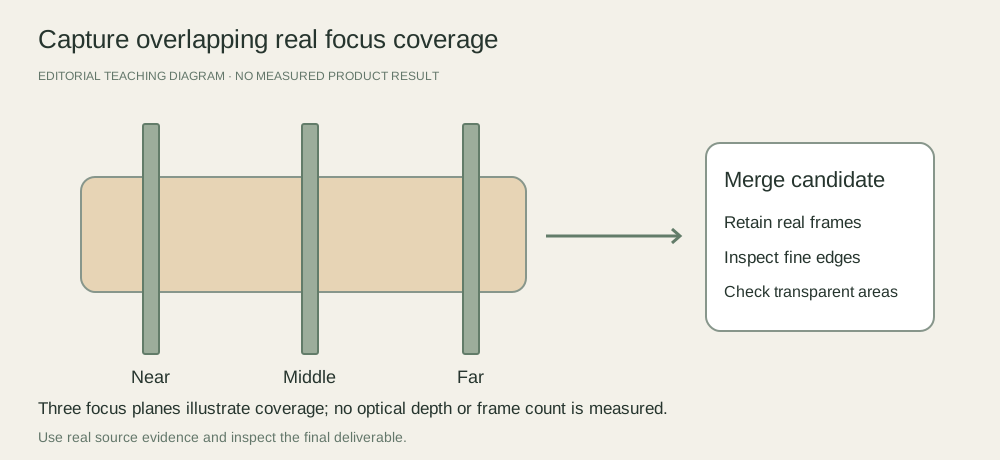
Three illustrative focus planes across a real-product capture plan, from front to back, feeding one merged candidate and an edge-artifact review
EDITORIAL CONCEPT
01 / EXAMPLEILLUSTRATIVE CONCEPT
What this shows

Coverage comes from multiple genuine frames.

Three planes explain the principle only. This is not a recommended frame count, a measured depth-of-field diagram or an actual stacked photograph.

Three illustrative focus planes across a real-product capture plan, from front to back, feeding one merged candidate and an edge-artifact review
Editorial conceptOriginal teaching diagram. It is not a generated product image, a customer example, or a measured test result.

This image is an editorial concept made for the site. It is not a Fayvoro generation or customer result. AI can change product shape, color, packaging, labels, and text. Check every important detail against the real item.

02 / A PRACTICAL WORKFLOWSTART WITH YOUR PHOTO
01

Decide whether a stack is necessary

Identify the exact near and far details the buyer needs. Try a suitable camera position and aperture for a real single-frame capture before adding a merge workflow. If the item or label can be placed closer to one focus plane without distorting the view, that may simplify the job.

A stack is useful only if the required information exists in the real source set. A frame of an unreadable, glare-covered label does not become factual label evidence merely because other areas are sharper. Keep focus problems separate from lighting and missing-view problems.

Plan ring product photographs — Capture ring band profile, actual setting, inner markings and a separate real size record. Use scene exploration for presentation while retaining factual jewelry close-ups.

02

Keep capture variables stable

Secure the product and camera and keep the light consistent. Move focus progressively through the necessary depth with enough overlapping sharp areas. Iconasys documents stable object position, camera position and lighting in a product-stack workflow. Choose step size and frame count through inspection of your own setup rather than copying an arbitrary count.

Record the source sequence and preserve every original. Check front and back coverage before dismantling the arrangement. Changing object position between frames can create a merge problem that software alignment does not fully resolve.

03

Inspect the merge against source frames

Adobe Photoshop documents loading frames as layers, aligning them and using Auto-Blend for an extended-depth composite. After any merge, inspect halos, duplicated edges, seams, fine holes and transparent parts against the original frames. Repair from genuine evidence or reshoot where the transition is uncertain.

Fayvoro does not capture or merge a focus stack and cannot establish missing fine detail from a scene generation. Use the real reviewed capture for factual close-ups. A secondary scene is a separate candidate with its own product check.
Practical decision worksheet

Keep the source coverage visible

Review the actual source set before and after the merge.

Need or findingNext actionEvidence to check
Near required detailStart coverage at the first necessary focus plane.The front detail is genuinely sharp in a source frame.
Overlapping middle planesProgress focus with stable camera, item and light.No required depth is absent from the source set.
Far required detailInspect the final coverage before dismantling the setup.The real back detail is present, not reconstructed.
Merged boundaryInspect fine edges, holes and transparent surfaces against originals.Halos and doubled details are repaired from evidence or reshot.

Use the worksheet in your existing capture, editing or storefront workflow. Fayvoro’s scene studio is a separate optional step and does not perform the editing or platform actions described here.

Direction to try

A useful starting note.

Use this as a starting point, then adjust it for your own product. No prompt can guarantee exact product details.

Explore one secondary scene from my already reviewed product reference. Keep my real focus-stack source frames and factual close-up separate; I will not use generated sharpness as evidence of labels, seams or unseen detail.
Before you publish

Check the details.

  • Required front-to-back detail and single-frame alternatives are considered.
  • Camera, item and light remain stable during the focus sequence.
  • The source set covers the needed depth with no missing required plane.
  • Merged edges and transparent parts are compared with retained real frames.
Common questions

A few things to know.

How many frames should I capture?

It depends on the depth, aperture and focus-step size in your setup. Inspect overlapping sharp coverage and test a real merge before choosing the sequence.

Is focus stacking the same as AI sharpening?

No. A real stack merges information captured at different focus positions. AI enhancement can change apparent detail and needs a different factual review.

Can Fayvoro stack my product captures?

No. The current studio accepts a reference for scene generation rather than a real focus-stack capture and merge workflow.

Make your image
with intention.

Explore one secondary product scene