All product image guides Electronics port product photography

Let a buyer check the connections before the scene.

The front of a device rarely explains whether it connects to a buyer's existing equipment. Build a gallery that shows the actual sides, connector layout and packed accessories, then keep performance specifications tied to the exact documented model.

Explore a scene from your actual device Two free credits when you sign up. Review the result before publishing.
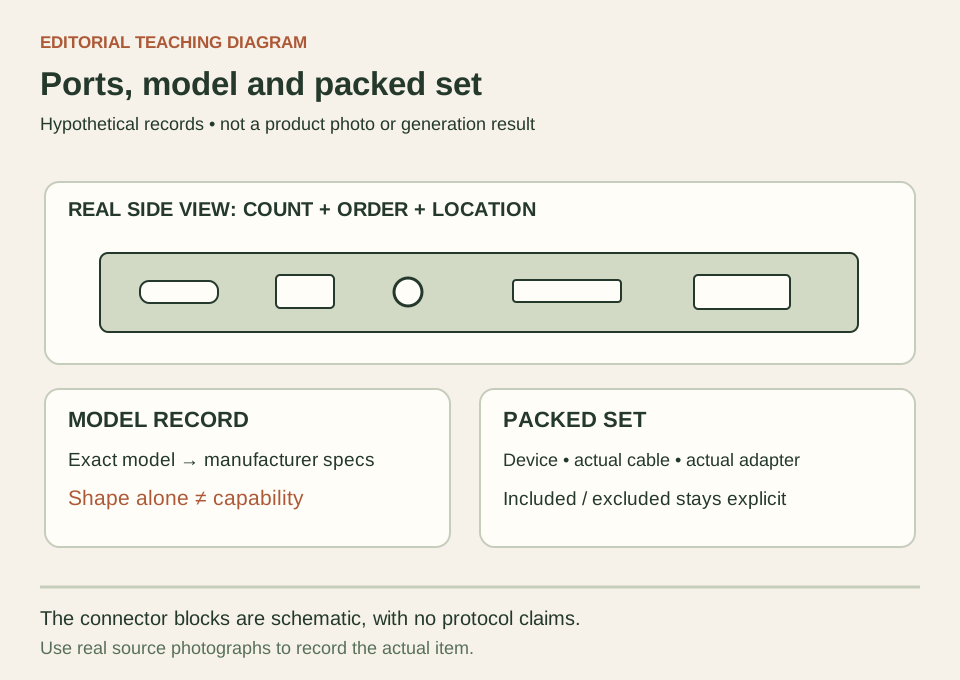
Teaching diagram of a fictional device side with port callouts, a model record and a packed-accessory checklist
EDITORIAL CONCEPT
01 / EXAMPLEILLUSTRATIVE CONCEPT
What this shows

A connector photograph and a specification answer different questions.

This schematic organizes visible openings, device identity and the included set. The invented connector blocks carry no technical specification. Use a real side photograph for construction and the manufacturer's documentation for what a port can do.

Teaching diagram of a fictional device side with port callouts, a model record and a packed-accessory checklist
Editorial conceptOriginal teaching diagram, not a product photograph, Fayvoro generation or customer result. Port shapes are illustrative placeholders. They do not identify a real device or prove protocol, charging or display support.

This image is an editorial concept made for the site. It is not a Fayvoro generation or customer result. AI can change product shape, color, packaging, labels, and text. Check every important detail against the real item.

02 / A PRACTICAL WORKFLOWSTART WITH YOUR PHOTO
01

Match the visible device to its model record

Record the product model, revision if documented, selected variant and sale condition before shooting. Use a filename or gallery record that connects every frame to this item. Keep the source of each specification beside the record, including whether it is the manufacturer's page for that exact model. Do not borrow a connector photograph from a similar enclosure just because the front panels look alike.

Apple's port-identification guide directs readers to the specifications of their own Mac model and illustrates port shapes and symbols. That is useful evidence that an outline alone is not a complete specification. In your listing, separate what the real photograph visibly shows from model-specific capabilities. A photograph of a familiar connector cannot establish data rate, video support, charging capacity or compatibility with every accessory.

  • Record left, right, rear and any concealed port panel as separate shot roles.
  • Resolve an uncertain revision from actual records before attaching capability claims.

Table Lamp Product Photography — Show the actual table lamp, shade, switch and included bulb status. Keep a real lit demonstration separate from a room concept and from measured light-output claims.

02

Shoot the connections and the packed set separately

Take the side or rear view nearly square to the connector plane, with enough light to see openings and enough surrounding body to locate them. Add a closer frame when labels are small, but retain the wider orientation view. Photograph a flap both closed and open when it matters, without forcing a hidden component into a flattering hero position. Compare count, order and label placement with the device itself.

Lay out only the accessories the buyer receives: device, power supply, cable, adapter and any documented attachments. Capture model information for a supplied power unit in a separate factual view when relevant. A cable used as a photography prop must not silently become part of the bundle. If an adapter is required but excluded, explain that in the product information rather than implying it through a staged working setup.

Plan phone case product photographs — Plan phone case photos that show the exact model, camera opening, side controls, charging cutout and inside surface. Keep compatibility claims tied to verified specifications.

03

Review construction before accepting a generated scene

A Fayvoro attempt can explore a setting from one real product image. Pick a source that shows the important construction, then request a quiet desk or shelf without extra equipment. This is not a multi-view reconstruction, a compatibility check or an electronics test. Keep the actual port views and accessory photograph as the buyer's evidence, regardless of how convincing a scene candidate looks.

Compare every visible opening, vent, button and cable to the source. Look for invented sockets, a missing power connector, wrong labels, impossible cable paths and a duplicated device. Also check whether a screen now implies software or a feature you have not demonstrated. Reject changed facts, or retain the original image instead. An image of a device apparently operating does not establish electrical safety, benchmark results or working condition.

Plan keyboard product photographs — Photograph the actual keyboard layout, key legends, side controls and included accessories. Keep AI desk scenes separate from layout and connectivity verification.

Direction to try

A useful starting note.

Use this as a starting point, then adjust it for your own product. No prompt can guarantee exact product details.

Use my uploaded photograph of this exact electronics model for one secondary desk scene. Keep the visible ports, buttons and body unobstructed, with soft light and a plain background. Do not add cables, adapters, screens, sockets or extra devices. I will compare the result with the actual model and packed set; this is not a compatibility test.
Before you publish

Check the details.

  • The photographed model and variant match the listing's specification source.
  • Connector count, location, shape and visible labels match the real side views.
  • Any pictured cable or adapter has a clear included or excluded status.
  • Screen content does not invent a supported app or feature.
  • Condition and performance remain supported by real inspection or test records.
Common questions

A few things to know.

Can an image tell me whether a USB-C-shaped port supports a display?

Not reliably. Verify the exact manufacturer's model specifications and any relevant real test. Similar visible connector shapes can serve different roles. A generated port should never be used as evidence of capability.

Can Fayvoro fill in a missing rear view?

A generated rear view would be an imagined construction, not documentation of the actual device. Photograph the real rear panel instead. Use one source image for a scene attempt and retain other factual views outside the generation.

Should I show accessories that make the setup look complete?

Show the included set clearly. If you also use a contextual accessory, identify it as excluded where the channel allows that presentation. Do not rely on a buyer noticing that the supplied-items paragraph disagrees with the image.

Make your image
with intention.

Explore a scene from your actual device