PRODUCT STORIES / A CREATIVE GUIDE

Wallet Product Photography

Show what the wallet holds and how it closes.

An outside view does not tell a shopper where notes, cards or coins go. A useful wallet gallery shows one actual unit empty, loaded with clearly identified props, and closed again before a desk scene adds atmosphere.

Sign up for 3 free credits · Your starting direction is included.See the example
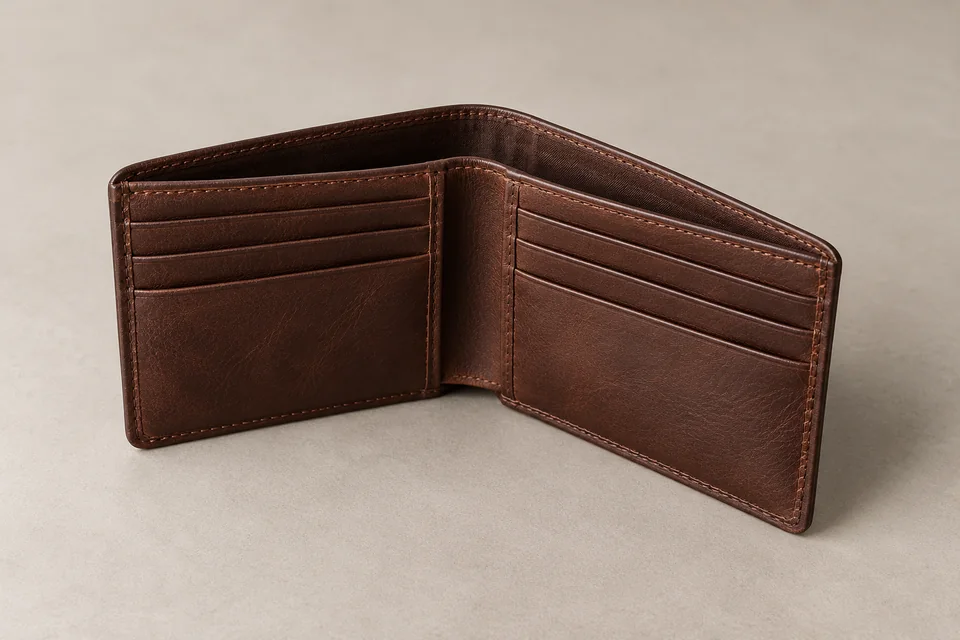
Fictional empty brown bifold wallet with visible card slots and open cash compartment
EDITORIAL CONCEPTAn editorial composition concept: use separate real photos to establish empty and loaded thickness. Not a real SKU or Fayvoro output.
01 / EXAMPLEILLUSTRATIVE CONCEPT
What this shows

Give each factual view a specific job.

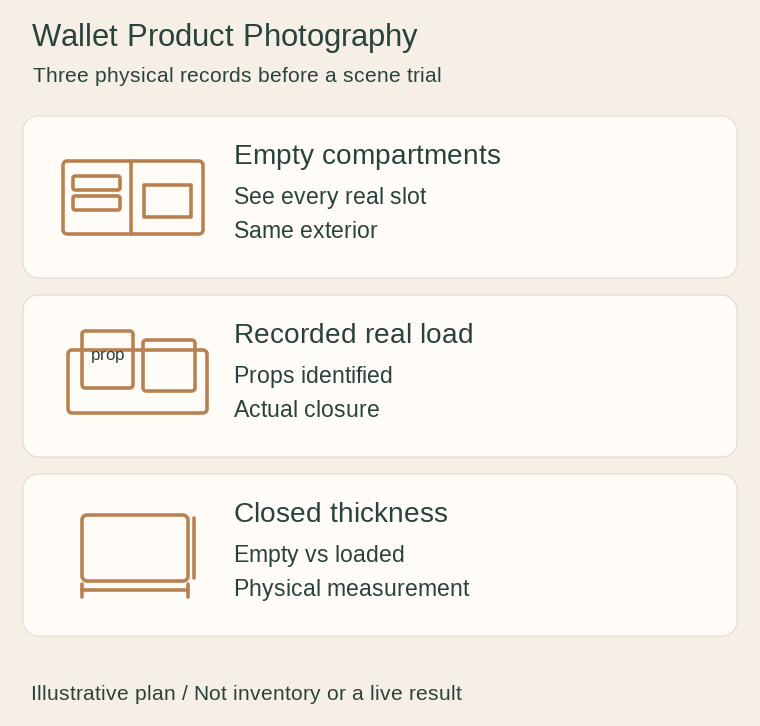
The plan below separates actual product records from a possible secondary scene. Its drawings help organize the gallery; use your own physical item and verified records for every sale fact.

Original teaching plan: Empty compartments, Recorded real load, Closed thickness
Editorial conceptOriginal illustrative teaching plan. Fictional shapes, not a photograph of inventory, a Fayvoro output or a customer case. No dimensions, composition or performance facts are asserted.

This image is an editorial concept made for the site. It is not a Fayvoro generation or customer result. AI can change product shape, color, packaging, labels, and text. Check every important detail against the real item.

YOUR STARTING IDEA

Take the direction. Make it your own.

Explore one calm desk scene from my real empty wallet photo. Add no cards, money, keys, new compartments or branding. I will compare the slots, folds, stitching and closure with the physical wallet.
Add your reference photo in the studio, then adjust the direction.
Before you publish

Compare the result with your real product and your destination’s requirements.

  • Empty, loaded and closed images use the same wallet.
  • The actual demonstration load is recorded.
  • Props are distinguished from supplied contents.
  • Dimensions, capacity and protection claims have physical records.
02 / A PRACTICAL WORKFLOWSTART WITH YOUR PHOTO
01

Start with the empty interior

Open the actual wallet far enough to expose the relevant slots, dividers, coin compartment and note section. Keep all parts connected to the same exterior view. A straight-on interior picture often answers arrangement questions better than a steep dramatic angle that makes one slot disappear.

Photograph any concealed flap or coin closure separately when it is a selling feature. Bellroy’s wallet example distinguishes note storage, coin space and hidden slots, illustrating why those roles deserve separate factual views. This is a reference for organizing a gallery, not a capacity or RFID claim for your product.

AI handbag product photography — Plan a photo-based handbag scene, then compare silhouette, straps, closure, hardware and leather texture with the actual bag.

02

Make the loaded state reproducible

Use generic cards or non-sensitive demonstration props, then record exactly what you placed in the wallet. Photograph it open and closed with that same load. Do not show personal card numbers, customer IDs or readable cash-related personal information; keep your reference files suitable for public viewing.

Measure the actual closed dimensions and thickness using a documented loading state. An empty wallet can look much slimmer than one filled normally. State that displayed cards, money and keys are props unless supplied, and support RFID protection or waterproofing with independent product records rather than a styled image.

03

Try a secondary scene from an approved reference

For a Fayvoro trial, choose a clean real photo of the approved empty or closed wallet and request one simple desk surface. A new image may alter slot count, stitching, fold direction or leather texture. Asking for a slim wallet does not establish how yours closes under load.

Reject a candidate that invents cards, adds a compartment, changes a clasp or creates a deeper bill section. Retain the original interior and loaded-thickness views as the selection evidence. You receive a single image from the request, not editable layers, a catalog-ready set of every state or a tested storage demonstration.

Common questions

A few things to know.

Is an empty exterior view enough?

Use an actual interior view when the buyer must choose among storage arrangements. Add a documented loaded/closed example for thickness.

Can generated cards show capacity?

No. Capacity needs a real, recorded loading demonstration. Generated cards can be added, merged or omitted.

Does the concept image prove a real wallet construction?

No. The editorial concept is fictional and cannot establish slots, materials or performance.

Make your image with intention.