All product image guides Product image social preview

Make the shared link show the right offer.

A product-page link card may use a different image from the gallery. Prepare a truthful preview asset, give the site owner a clear metadata handoff, and inspect the actual card wherever a customer shares the link.

Explore a preview scene candidate Two free credits when you sign up. Review the result before publishing.
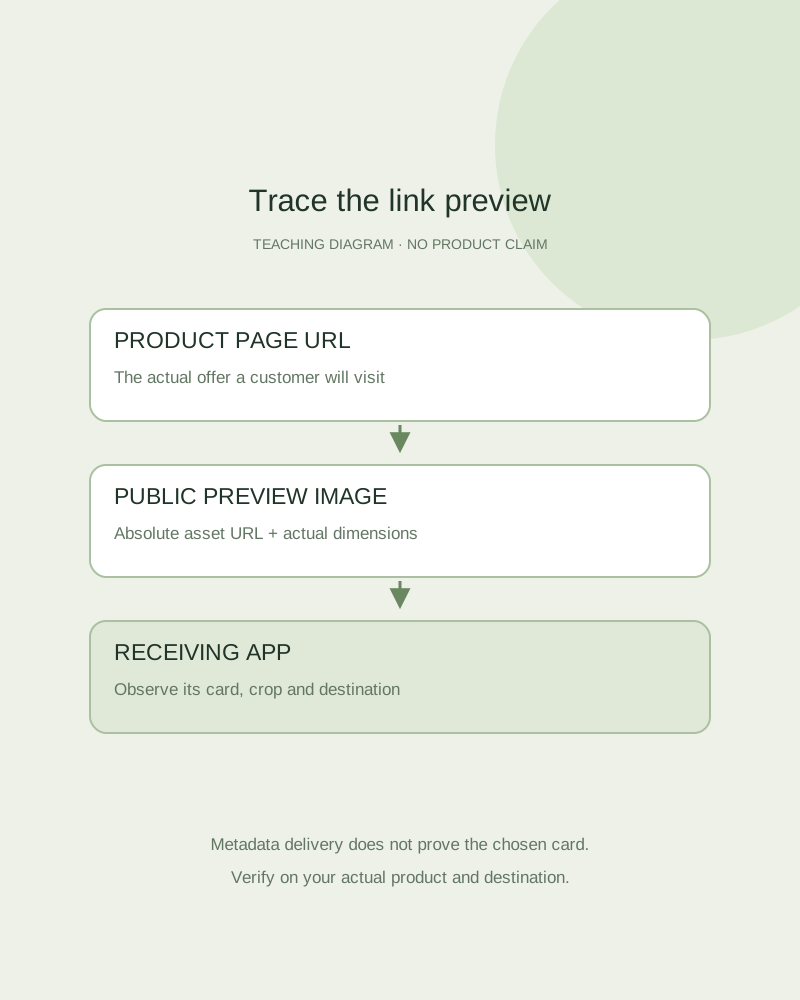
Teaching link-card diagram separating the product URL, metadata image and receiving-app crop
EDITORIAL CONCEPT
01 / EXAMPLEILLUSTRATIVE CONCEPT
What this shows

The page and the preview image are separate URLs.

The diagram describes a link-preview workflow without opening or operating any social account. It does not promise a particular app’s crop, cache behavior or card format.

Teaching link-card diagram separating the product URL, metadata image and receiving-app crop
Editorial conceptOriginal teaching diagram, not a product photograph, Fayvoro generation or customer result. This is a protocol handoff diagram, not a platform preview or a published social post.

This image is an editorial concept made for the site. It is not a Fayvoro generation or customer result. AI can change product shape, color, packaging, labels, and text. Check every important detail against the real item.

02 / A PRACTICAL WORKFLOWSTART WITH YOUR PHOTO
01

Choose a truthful preview asset

Decide whether the link represents one SKU, a bundle or a collection. Keep the pictured quantity and variant consistent with the landing page. Use an uncluttered composition where essential product edges remain visible after a plausible crop; avoid relying on tiny image text for the offer.

The Open Graph protocol defines page metadata including a title, type, image and URL, with optional image dimensions and descriptive alternative text. It does not set one universal display ratio for every receiving app. Inspect the current documentation or actual preview for the destination you need.

02

Prepare the site-owner handoff

Record the canonical product-page URL, absolute public image URL, title, description and meaningful image description. Note the actual exported width and height. Make sure the image is accessible without a signed-in session and that its content type matches the file.

If a new image replaces an old card, record the new asset URL and the page revision. Receiving applications may cache previews; changing a local filename alone does not demonstrate that a shared link has updated. Fayvoro does not write your store’s Open Graph tags or clear another service’s cache.

03

Check the actual card without guessing

Use an allowed preview tool or a controlled share of your own product link in the receiving app. Compare title, image, crop and destination, and record the time of the check. A successful image download is a delivery check, not proof that the app chose that file.

Fayvoro offers 1:1, 4:5 and 9:16 generation formats, not every possible card ratio. A separate crop in your editor may be needed, and it cannot restore content outside the image. Keep real product details accurate after generation and crop, then retain a factual original if the preview implies a different item.
Practical decision card

Prepare the preview handoff

Record the reviewed asset and product page. This card does not fetch URLs, publish posts or clear an application cache.

Manual planning and review; no automatic product inspection.
Metadata recordWhat to provideVerification
Page URL and titleThe actual product landing page and offer titleThe opened destination matches the pictured offer.
Image URLAn absolute public URL of the reviewed assetNo login requirement; the correct image is delivered.
Image dimensions and descriptionActual exported width/height and useful alt descriptionRecord the file, not an assumed generator size.
Receiving applicationObserved title, image, crop and check timeDo not treat source metadata as observed card rendering.
Open Graph does not guarantee a universal ratio. A platform’s actual card selection and cache behavior need their own observation.

Provide two complete HTTPS URLs without embedded credentials, a title and an image description.

Text is a draft record, not installed metadata. Nothing is fetched, published or saved.
Direction to try

A useful starting note.

Use this as a starting point, then adjust it for your own product. No prompt can guarantee exact product details.

Use my actual product photo for one simple scene with generous space around the whole item. Avoid promotional text, invented labels and extra units. I will make and inspect a separate preview crop for the destination before using it.
Before you publish

Check the details.

  • The preview corresponds to the page’s actual offer.
  • An absolute public image URL and actual dimensions are recorded.
  • The site owner verifies metadata separately from the gallery.
  • The receiving app’s observed card and destination are checked.
Common questions

A few things to know.

Does Open Graph guarantee the same crop everywhere?

No. Receiving applications choose their display and caching behavior. Check the actual destination.

Can Fayvoro install preview metadata in my store?

No. Give the site owner the reviewed image and metadata record for implementation.

Is this a social account publishing tool?

No. It is an image and site-metadata preparation guide. It does not connect to or publish on a social platform.

Make your image
with intention.

Explore a preview scene candidate