PRODUCT STORIES / A CREATIVE GUIDE

Pinterest Product Pin Images

Keep the inspiration image tied to the buyable product.

A Pin can inspire a shopper with a setting, while its product information describes a precise item. Before creating a new scene, confirm which real product the image will represent and where a shopper will land.

Sign up for 3 free credits · Your starting direction is included.See the example
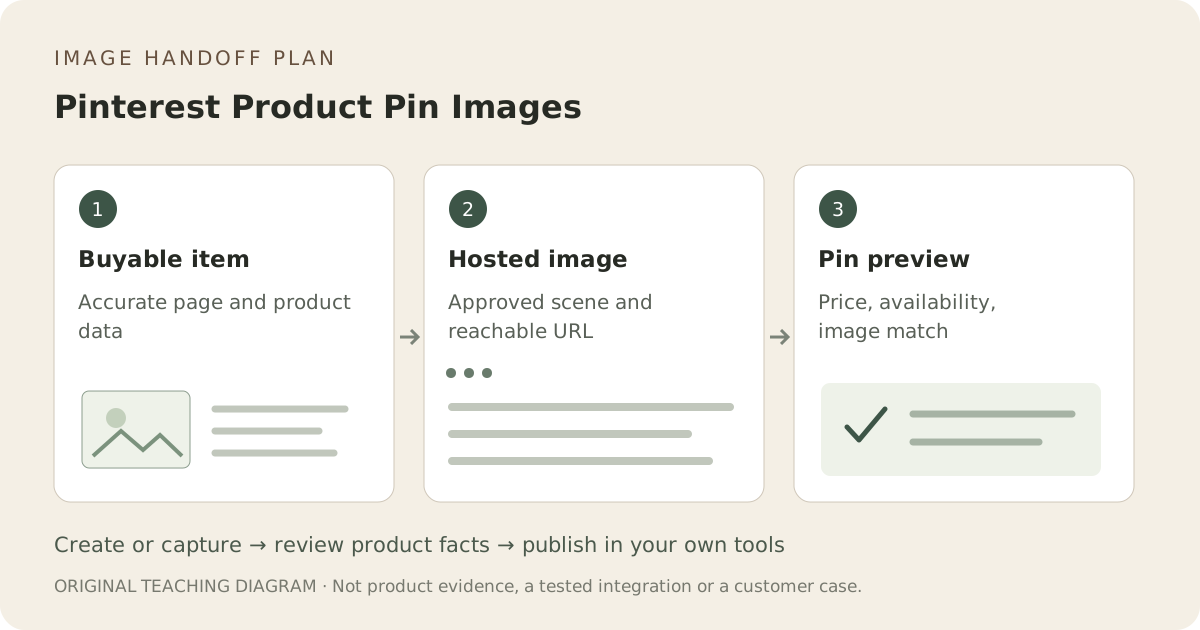
Original illustrative workflow: Buyable item, Hosted image, Pin preview
EDITORIAL CONCEPT
01 / EXAMPLEILLUSTRATIVE CONCEPT
What this shows

Give each image a specific delivery job.

This illustrative workflow separates image creation from the checks and publishing steps you complete in your own tools. The sequence is a planning aid, not a tested integration or evidence of listing approval.

Original illustrative workflow: Buyable item, Hosted image, Pin preview
Editorial conceptOriginal teaching diagram, not a product photograph, Fayvoro result, platform screenshot or customer case.

This image is an editorial concept made for the site. It is not a Fayvoro generation or customer result. AI can change product shape, color, packaging, labels, and text. Check every important detail against the real item.

YOUR STARTING IDEA

Take the direction. Make it your own.

Use this actual product photograph to explore one calm lifestyle composition. Keep the exact item unobscured, with no additional sale units, prices, platform logos or invented variant details. I will verify the scene against the product page before hosting it.
Add your reference photo in the studio, then adjust the direction.
Before you publish

Compare the result with your real product and your destination’s requirements.

  • Image represents a real buyable item and the correct option.
  • Concepts are not passed off as inventory or installation photographs.
  • Hosted image is reachable by an outside viewer.
  • Pin/catalog image, availability and price agree with the product page.
02 / A PRACTICAL WORKFLOWSTART WITH YOUR PHOTO
01

Identify the type of Pin you are preparing

Pinterest distinguishes image Pins from Product Pins. Product Pins represent purchasable products and can be created through a retail catalog or product rich Pins. Creating an image alone does not establish a catalog connection, merchant eligibility or current price and stock information.

02

Match the visual to the actual product page

Use the same item, option and supplied count as the buyable page. A styled room may be useful context, but decorative objects must not make the offer ambiguous. Keep the real dimensions and product details on the landing page, and do not use a concept for a product that is not actually available to buy.

03

Create and review a scene before hosting it

Fayvoro can explore a secondary setting from your product photo. It does not publish Pins, claim your website, install tracking or synchronize product metadata. Download the approved scene and host the selected file through the tools you already use. Confirm an outside visitor can retrieve the actual image URL.

04

Inspect catalog and product details after the handoff

Pinterest’s catalog preview lets merchants inspect the image URL, price, availability and associated data source. Review those records against your product page after an update. A valid image URL does not establish that a new file, a price change or a variant is already reflected in the Pin.

Common questions

A few things to know.

Does Fayvoro publish or synchronize Product Pins?

No. Use your own Pinterest and store tools for catalog, metadata and publication.

Is an ordinary uploaded Pin automatically a Product Pin?

No. The Product Pin/catalog or rich-Pin setup is a separate process from preparing an image.

Can a generated room prove the product fits that space?

No. Use real measurements and photographs for fit. A generated setting is composition direction until reviewed for its intended role.

Make your image with intention.