All product image guides Greeting Card Product Photography

Let buyers check what the card says inside.

A greeting card front can sell the illustration while hiding the inside message and envelope choice. Build an actual card gallery around those facts first. A secondary gifting scene can add atmosphere, but exact wording remains a real photograph and product record.

Explore a scene from your real photo Two free credits when you sign up. Review the result before publishing.
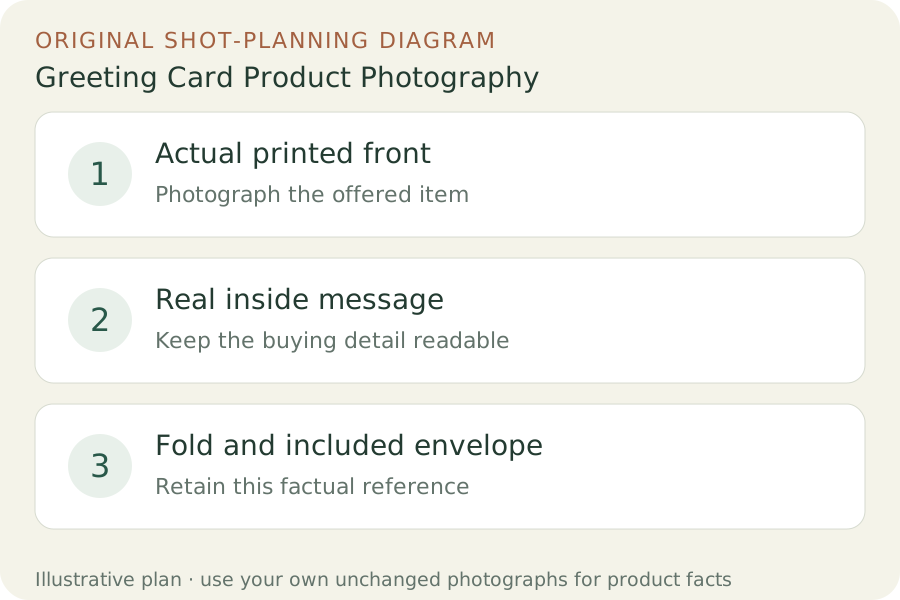
Original teaching diagram: Actual printed front, Real inside message, Fold and included envelope
EDITORIAL CONCEPT
01 / EXAMPLEILLUSTRATIVE CONCEPT
What this shows

Give each photograph one clear job.

Use the three labeled views to plan your factual gallery. The outlines show composition roles only; they contain no observed dimensions, verified materials or performance measurements. Keep real photographs beside any secondary scene candidate.

Original teaching diagram: Actual printed front, Real inside message, Fold and included envelope
Editorial conceptOriginal teaching diagram for shot planning. Illustrative outlines, not a photograph of inventory, a Fayvoro output or a customer example.

This image is an editorial concept made for the site. It is not a Fayvoro generation or customer result. AI can change product shape, color, packaging, labels, and text. Check every important detail against the real item.

02 / A PRACTICAL WORKFLOWSTART WITH YOUR PHOTO
01

Keep front artwork and inside wording connected

Record the card design version, size, paper option and whether the inside is blank or printed. Photograph the actual front and open inside as separate real frames. Keep the inside assigned to the correct design. A blank digital template does not establish that your printed card is blank inside, and an illustrated front does not explain a personalizable option.

MOO separates greeting-card paper, inside-writing space and envelope choices in its offer. Use your own product information for those decisions; do not borrow its dimensions or inclusion policy for your shop. State the supplied card and envelope count, including any pack variations. Keep personalized customer examples permitted and clearly identified as examples rather than stock messages.

02

Show the fold and finish without losing the text

Make a nearly front-facing artwork view with the full card edges in frame. Add an open spread and a closer fold or paper-edge photograph. Use light that reveals a foil or gloss detail in one frame, while retaining another angle where wording stays readable. A bright reflection should not erase a sentiment the buyer is choosing.

Photograph the actual envelope color and format alongside the correct card, then make a separate complete-pack view when selling multiples. Keep handwriting props excluded unless part of the offer. A handwritten demonstration is not the same as a printed message or a service you provide. Exact print quality and writable surface behavior require the physical card, not an image mockup.

03

Try a gifting scene after the message is verified

Upload one clear actual card photograph for a Fayvoro stationery-display scene. Request a quiet desk or gifting surface with the existing artwork unobstructed and no new text. Keep the real inside and envelope photographs as the purchasing references. This is not a card-layout editor, personalization system or print-production export.

Read every visible word in the candidate against the original. Check fold direction, paper shape, illustration, finish and envelope count. Reject invented sentiments, repaired spelling or an added gift that changes the offer. Use the unchanged real card image when lettering cannot be verified. A scene is supporting presentation, not approval of the print file.
Direction to try

A useful starting note.

Use this as a starting point, then adjust it for your own product. No prompt can guarantee exact product details.

Use my actual greeting card photograph for one quiet stationery-display scene on a plain surface in soft light. Keep the existing front artwork and wording visible. Add no message, handwriting, gift or envelope. I will read every visible word against the real card; this is not a printable production file.
Before you publish

Check the details.

  • Actual front and inside belong to the same design version.
  • Blank, printed and personalizable inside options are distinguished.
  • Envelope color and pack count match the real offer.
  • Foil or gloss detail has a separate readable text reference.
  • Generated words are rejected when they differ from the actual card.
Common questions

A few things to know.

Should I show the inside even when it is blank?

Yes when it answers a buyer’s question. A real inside view and a clear blank-inside statement are stronger than leaving shoppers to infer it from the front.

Can Fayvoro personalize or print the card for me?

This workflow explores a raster scene from an existing photograph. It does not demonstrate a card personalization or print-production service.

Can the scene replace a proof of exact printed wording?

No. Keep the actual wording record and real close-up. Generated letters can change even when the overall composition looks right.

Make your image
with intention.

Explore a scene from your real photo