02 / A PRACTICAL WORKFLOWSTART WITH YOUR PHOTO
01Read the surrounding page before drafting
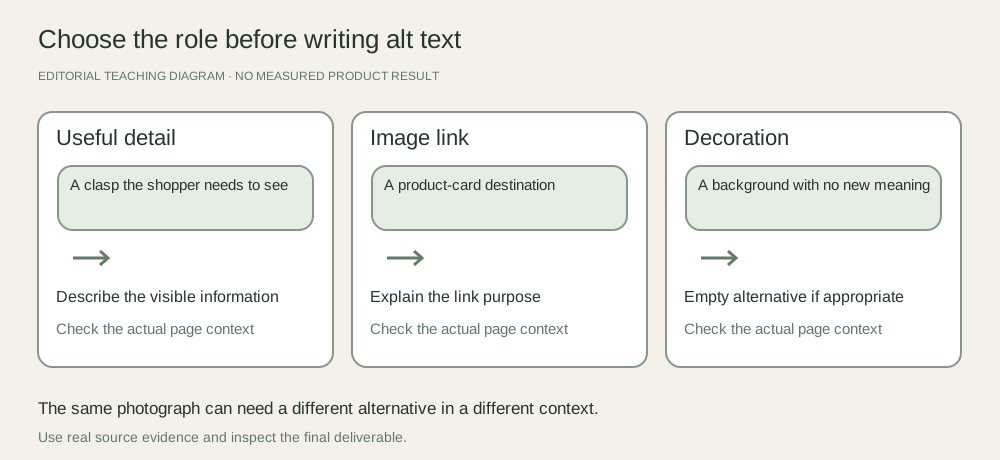
Inspect the product title, selected variant, caption and the action attached to the image. W3C distinguishes informative images, functional images and decoration. Apply that distinction to the actual rendered element: a photograph inside a product link may need to communicate the link’s destination, while a standalone detail photo needs its useful visual information.
Do not label every lifestyle photograph decorative simply because it is attractive. If it shows where a handle attaches or the visible contents of a bundle, it may communicate information the adjacent text does not. Conversely, an image that repeats the nearby information may need an empty alternative, depending on its context.
Describe this view, not the entire catalog
For an informative image, name the product briefly and add the detail the view reveals. An illustrative draft such as “Blue ceramic mug, handle and glazed interior visible” is more useful than a list of search phrases. Check color and material against the SKU; the draft is not evidence that this mug exists.
Keep different views meaningfully different: “rear zipper pocket open” and “strap attachment close-up” identify information, while “image 2” and “best leather bag online” do not. Do not infer dimensions, performance or material authenticity from pixels. Put essential specifications in the actual product description as well.
Check the element in its live context
Use your store’s image or theme editor to save the approved alternative, then inspect the rendered page. A field in an admin form is not proof that a theme uses it. Keyboard navigation can help reveal whether a linked card has a clear purpose, and a screen reader or an accessibility reviewer can assess the surrounding experience.
Fayvoro creates scene candidates; it does not write or install alt text in your storefront. If a generated image is included, describe what it actually shows and disclose its origin where that matters to shoppers. Do not make the alternative assert product accuracy that has not been checked.