PRODUCT STORIES / A CREATIVE GUIDE

Halloween product photography

Set a spooky mood. Keep the product in the light.

Halloween product photos can use a single pumpkin shape, a plum backdrop or a long shadow instead of a crowded haunted set. Plan the seasonal accent around the actual product, with enough light to see what the customer is buying.

Sign up for 3 free credits · Your starting direction is included.See the example
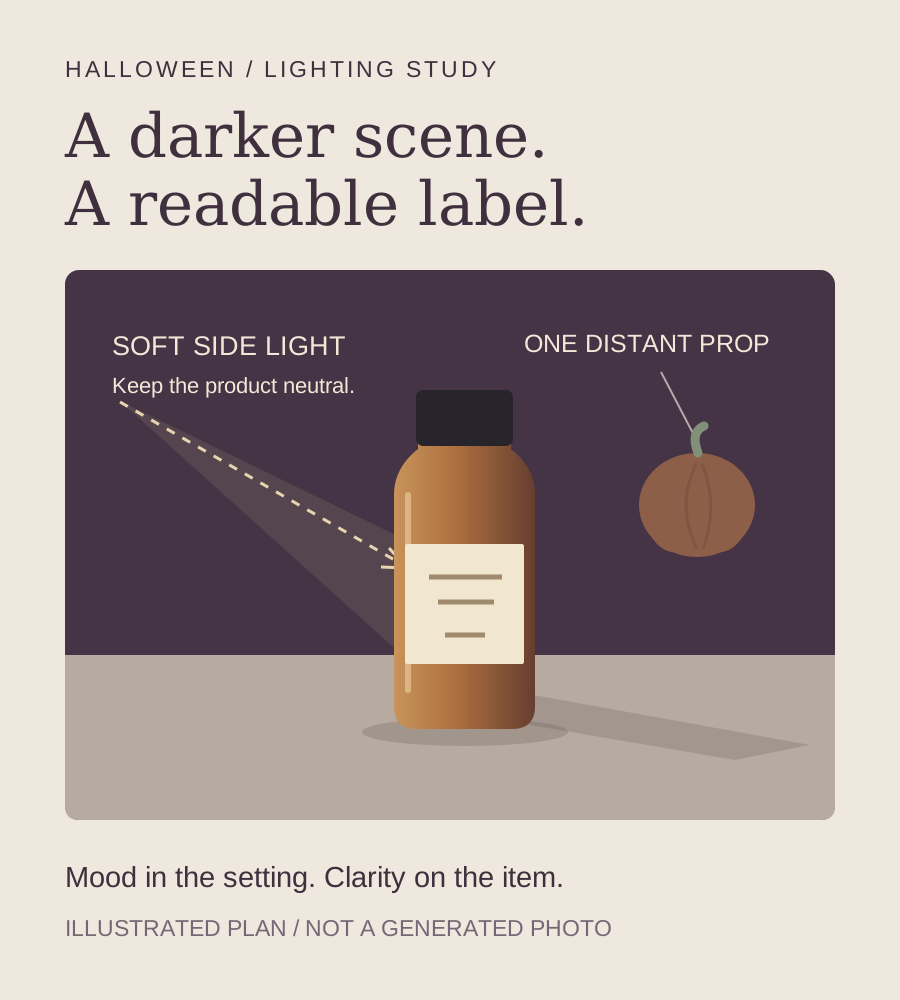
Halloween lighting plan with a readable schematic bottle, a distant pumpkin and a light path separated from a darker plum background
EDITORIAL CONCEPTAn illustrated lighting and prop plan. It is not a Halloween Fayvoro output or evidence of product fidelity.
01 / EXAMPLEGENERATED WITH FAYVORO
What this shows

Understand the reference workflow before the seasonal brief.

This existing unbranded bottle example came from the live Fayvoro service. It is a general warm-interior scene, not a Halloween result. The diagram and prompt describe a new direction that you should test and review against your own item.

Unbranded amber bottle reference used for the existing Fayvoro demonstration
Input photoReference used for this demonstration.
Existing live Fayvoro demonstration of an amber bottle in a warm interior
Live Fayvoro resultAn existing photo-to-scene demonstration, not a seasonal generation or a customer product. The seasonal diagrams and prompts on this page have not been tested against a real SKU.

This is one demonstration result; your result may differ. AI can change product shape, color, packaging, labels, and text. Check every important detail against the real item.

YOUR STARTING IDEA

Take the direction. Make it your own.

Use my uploaded product photo as the reference. Place the product on a neutral matte surface against a muted plum background. Add one small out-of-focus pumpkin far behind it and soft side light that keeps the front label readable. Leave clear space above. Do not add text, smoke, webs on the product, extra items, flames or new packaging. Keep the original product color; I will inspect the result.
Add your reference photo in the studio, then adjust the direction.
Before you publish

Compare the result with your real product and your destination’s requirements.

  • Neutral product color and package details remain accurate despite the dark setting.
  • The label and product outline are readable at the final mobile size.
  • Pumpkins, candy and other props do not imply included extras or ingredients.
  • Wick, flame and nearby props do not create an implausible or unsafe candle scene.
02 / A PRACTICAL WORKFLOWSTART WITH YOUR PHOTO
01

Pick one Halloween cue that suits the product

For a candle or home accessory, try one small pumpkin far behind the product. For skincare or fragrance, a muted plum background can suggest the season without inventing ingredients. For a simple graphic direction, try a long side shadow on a neutral surface while leaving the front label lit. Keep the product as the largest clear subject in each composition.

An orange accent can work at the edge, but strong orange illumination may make clear liquid, pale wax or white packaging look like a different variant. Review the package under neutral viewing light. Do not let decorative smoke, webs or a dark foreground cover the label, wick, opening or distinguishing product detail.

  • Distant pumpkin: one recognizable seasonal shape, away from the product.
  • Muted plum: atmosphere from the background rather than recoloring the package.
  • Long side shadow: a simple lighting direction with a readable front face.
02

Keep the real SKU and the decorative story separate

Photograph the actual product in a clean, neutral setting first. Keep that source available for the front view, detail, scale and package information. If you sell an actual Halloween label or limited-edition box, upload a photo of that variant; a prompt is not a reliable way to redesign ordinary packaging into saleable seasonal inventory.

For candle photography, compare the vessel, lid, wax, wick count and flame state with the source. Do not treat a generated flame as evidence of burn behavior or show combustible decorations touching it. For food or beauty products, decorative candy, herbs or pumpkins should not imply a flavor or ingredient that the product does not contain.

03

Use a short review loop when Halloween is close

Halloween is October 31, 2026. If your campaign is close to its release date, choose one product and one image placement first. In Fayvoro, upload your JPG, PNG or WebP of 10 MB or less, choose an available base scene, and paste the prompt below into extra instructions. There is no dedicated Halloween preset; the prompt asks for a scene direction.

Review the first result before requesting another image. Pick 1:1, 4:5 or 9:16 for the intended layout and check the mobile crop. Add any campaign wording separately, using only your confirmed stock and delivery dates. If the generated product is inaccurate, use the original photograph; a deadline is not a reason to publish changed packaging.

Seasonal release board

Make the deadline
part of the brief.

Plan one campaign image. This browser-only board does not save dates, schedule a post, or make a batch of seasonal outputs.

0 of 5 release checks markedChoose an occasion · set a release date

These checks are your plan, not independent verification. Approve each actual result and destination placement before scheduling.

Common questions

A few things to know.

How do I make Halloween product photos without props?

Use the background color or a shadow as the seasonal cue. You can describe that direction around an uploaded product photo in Fayvoro. It is a generated scene, so inspect the product and lighting rather than assuming the original pixels are preserved.

Can AI turn a normal label into a Halloween edition?

It may invent a label, but that does not establish a real product variant. Photograph the actual seasonal package when selling one, and use your original close-up when exact wording or artwork matters.

What should I make first for a last-minute Halloween campaign?

Choose one real product, one placement and one restrained seasonal cue. Review a single candidate against the source before making more. If you cannot approve the generated product in time, use the original photo and add your campaign copy separately.

Make your image with intention.