PRODUCT STORIES / A CREATIVE GUIDE

eBay Product Photos

Show the exact condition before polishing the presentation.

For an eBay listing, a new scene must not erase what makes this particular item different. Real scratches, missing parts, packaging and model markings are purchase information, especially for used inventory.

Sign up for 3 free credits · Your starting direction is included.See the example
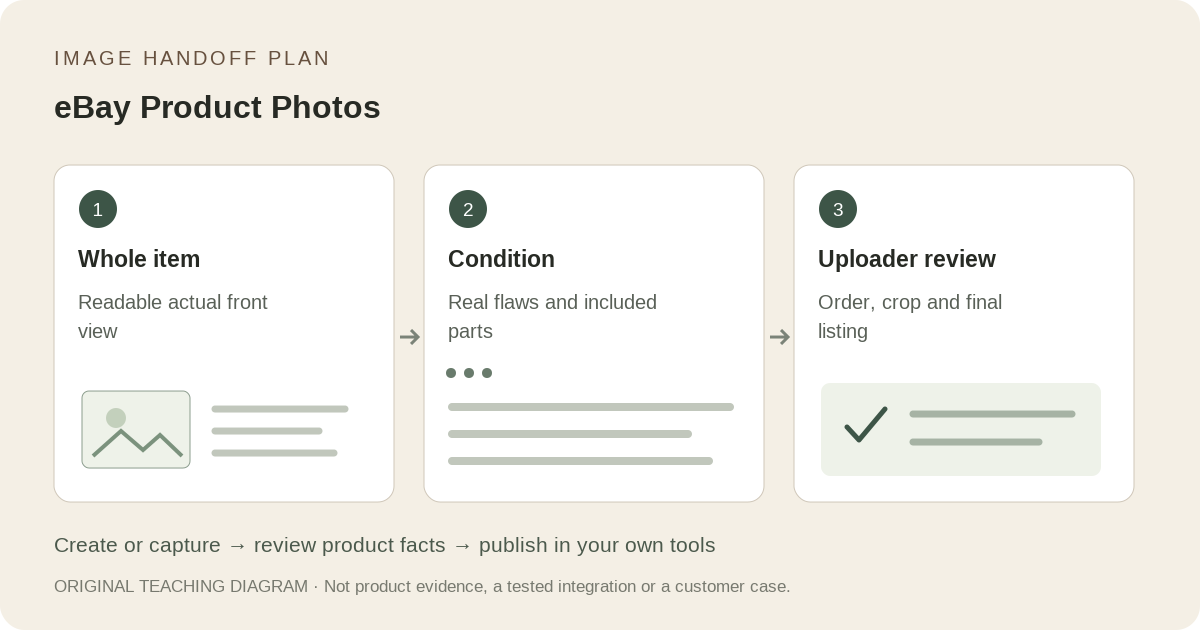
Original illustrative workflow: Whole item, Condition, Uploader review
EDITORIAL CONCEPT
01 / EXAMPLEILLUSTRATIVE CONCEPT
What this shows

Give each image a specific delivery job.

This illustrative workflow separates image creation from the checks and publishing steps you complete in your own tools. The sequence is a planning aid, not a tested integration or evidence of listing approval.

Original illustrative workflow: Whole item, Condition, Uploader review
Editorial conceptOriginal teaching diagram, not a product photograph, Fayvoro result, platform screenshot or customer case.

This image is an editorial concept made for the site. It is not a Fayvoro generation or customer result. AI can change product shape, color, packaging, labels, and text. Check every important detail against the real item.

YOUR STARTING IDEA

Take the direction. Make it your own.

For internal composition planning only, place this actual item in a plain, uncluttered studio scene. Do not smooth wear, add parts, alter text or invent a new condition. Compare every result against my original; do not use an inaccurate result in the listing.
Add your reference photo in the studio, then adjust the direction.
Before you publish

Compare the result with your real product and your destination’s requirements.

  • Actual condition is still visible in the real listing photographs.
  • Each supplied part and flaw is represented accurately.
  • Main picture is whole-item evidence, without added marketing overlays.
  • Uploaded order and any replacement are verified in the listing preview.
02 / A PRACTICAL WORKFLOWSTART WITH YOUR PHOTO
01

Use current eBay policy as the publishing gate

eBay requires at least one photograph and its Picture Policy specifies at least 500 pixels on the longest side. The uploader guide recommends larger photographs, including around 1600 by 1600 pixels. Keep a requirement separate from a recommendation, and check the current uploader for your specific category.

02

Make a condition set before editing

Photograph the actual item from the front, relevant sides and the areas a buyer should inspect. For a used watch, a face view is not enough if the clasp or crystal is scratched. Capture those details in real light and keep the originals; generating a clean version can destroy the information the buyer needs.

  • Keep damage visible and match it to the condition description.
  • Show only the pieces that ship with this listing.
03

Avoid selling a cleaner imaginary item

The Picture Policy bars inaccurate representation, added marketing text, borders and watermarks, and does not allow stock photographs for used, damaged or defective items. Fayvoro does not certify eBay compliance or preserve all wear. For a used-item listing, use your accurate real photographs rather than an imagined scene.

04

Check the main image and replacement after upload

The first picture becomes the search-result main image. Arrange the whole-item photograph first, followed by condition and included-parts views. Open the listing preview to check crops and text. If replacing a photo imported by URL, eBay advises using a new URL; verify the actual replacement before assuming it changed.

Common questions

A few things to know.

Can I use a generated photo for a used eBay item?

Use real, accurate photographs of the actual used item. A generated scene may alter its wear, and this page does not establish eligibility for a specific generated file.

Is 1600 by 1600 a mandatory minimum?

The uploader guide recommends approximately that size. The Picture Policy states a 500-pixel longest-side minimum. Recheck current category and upload rules.

Will Fayvoro remove a watermark accurately?

No watermark removal or pixel-preserving edit is promised. Start from a photograph you have permission to use.

Make your image with intention.