PRODUCT STORIES / A CREATIVE GUIDE

Book Product Photography

Identify the edition before styling a reading scene.

Two books with the same title can differ in binding, edition, cover and contents. A seller needs photographs of the actual offered copy or current edition before exploring atmosphere around it.

Sign up for 3 free credits · Your starting direction is included.See the example
One fictional blank-covered hardback book on a wooden table in an editorial scene concept.
EDITORIAL CONCEPTEDITORIAL CONCEPT. Fictional scene direction, with no real title or ISBN. A real edition and its cover need real photographic evidence. Not a live Fayvoro generation or customer case.
01 / EXAMPLEILLUSTRATIVE CONCEPT
What this shows

Give each view a specific job.

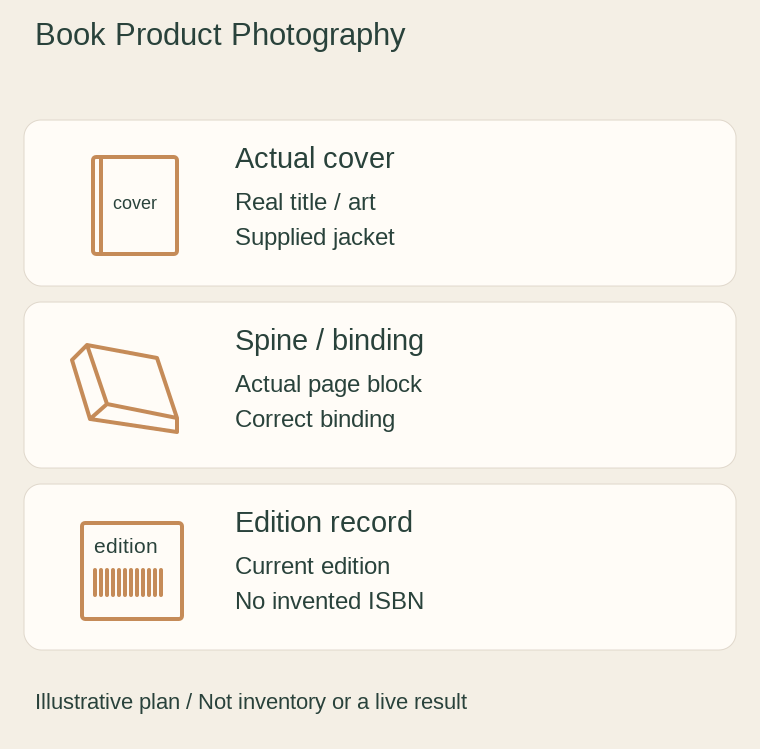
Use this illustrative plan to organize real evidence and a separate optional scene. The drawn objects and quantities do not specify the item you sell.

Original illustrative plan: Actual cover, Spine / binding, Edition record.
Editorial conceptOriginal teaching diagram. It is not a photograph of inventory, measured specification, live Fayvoro result or customer case.

This image is an editorial concept made for the site. It is not a Fayvoro generation or customer result. AI can change product shape, color, packaging, labels, and text. Check every important detail against the real item.

YOUR STARTING IDEA

Take the direction. Make it your own.

Use my approved photograph of the actual book for one quiet reading-table scene. Show one book with no added volumes, pages or printed text. I will compare the real binding, cover, spine and edition details with the source.
Add your reference photo in the studio, then adjust the direction.
Before you publish

Compare the result with your real product and your destination’s requirements.

  • The title, edition, binding and identifier match the listing.
  • Jacket and slipcase states agree with the supplied item.
  • Interior samples and any condition defects are real and authorized.
  • Generated lettering and book construction are inspected before use.
02 / A PRACTICAL WORKFLOWSTART WITH YOUR PHOTO
01

Make the edition easy to identify

Photograph the actual front cover straight enough to read the title and author. Add a spine view and a back-cover identification view where relevant. Match the identifier and binding to the listing record. The ISBN agency describes identifiers as edition- and format-specific; the shared title alone is not enough to distinguish an offer.

Keep a dust jacket, slipcase or other removable part in its correct supplied state. If an image shows the jacket removed, add the complete assembled view as well. Do not style a paperback source into a hardcover silhouette or add a ribbon marker that is absent from the sold edition.

Notebook Product Photography — Show actual page ruling, binding-open state and page count versus sheets; a physical writing sample is separate from blank inventory and imagined desk composition.

02

Show construction and condition without inventing pages

Use a real oblique view to show the page block and binding thickness. Photograph a relevant interior sample only when you have permission to reproduce it and the sample is appropriate for the listing. Keep page order and visible text genuine; a generated spread can invent content while appearing plausible.

For used copies, show the actual defects that affect the purchase, including marked pages, worn corners, spine creases or a missing jacket. Keep the condition description tied to that specific copy. For new inventory, an atmospheric stack of several books must not imply a multi-volume offer when only one book is sold.

03

Trial one secondary scene from the real book

Use your own approved photograph for a reading-table or shelf scene. Fayvoro does not preserve cover lettering, barcode, page count or binding details exactly. Compare the actual output with the source at readable size, especially the spine and printed design. Reject a result that changes the offered edition or invents a recognisable publisher mark.

Keep real cover and identifier photos as the primary buying evidence. A text-only book concept can be useful for visual direction but must not be presented as an existing title. The fictional, unlettered editorial composition on this page does not demonstrate exact cover preservation or a merchant-owned book result.


Common questions

A few things to know.

Can a title-only AI prompt represent a book I sell?

It can create a fictional visual concept, but it cannot authenticate a real edition, cover or interior.

Should I photograph the spine and back too?

Use those views when they help identify binding, edition or the actual copy. A front cover alone may omit important selection facts.

Will Fayvoro keep cover typography exact?

Exact typography is not guaranteed. Keep the real cover photograph when wording and design must remain accurate.

Make your image with intention.