02 / A PRACTICAL WORKFLOWSTART WITH YOUR PHOTO
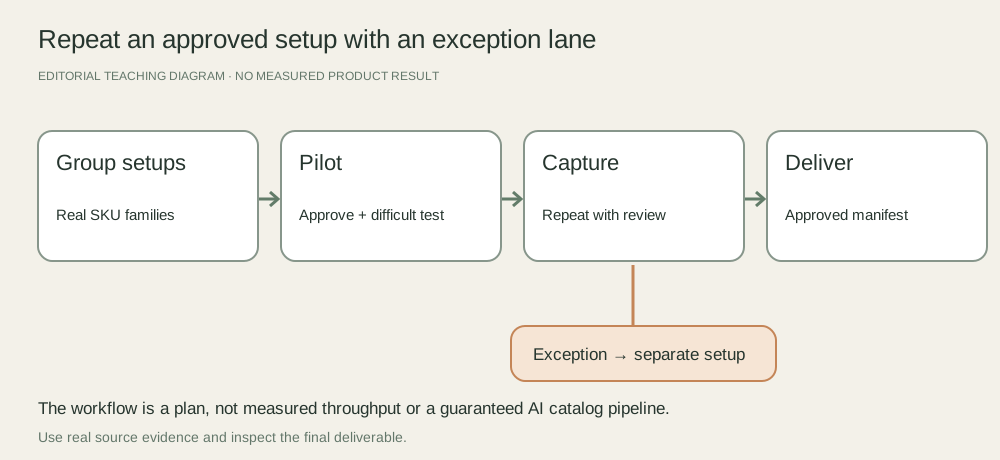
01Group by capture behavior rather than category name
A small matte box, tall glossy bottle and transparent jar may need different light, framing and edge treatment even if they sit in one catalog category. Group items by the setup they genuinely share, and list required factual views for each SKU before scheduling.
Prepare physical products, variant identifiers, cleanup supplies and the naming manifest. Record missing stock or unclear variants as exceptions before the session so they cannot be silently filled with a generated recolor. The shot-list guide handles which views you need; this workflow handles repeating the capture operation.
Approve a representative pilot setup
Capture one representative real item and review its focus, outline, label, exposure and destination crop with the owner. Record camera position, support height, lighting arrangement and settings. Manufacturers such as Iconasys document storing camera and crop profiles for repeatable capture; your own manual setup can also use measured marks and a written setup note.
Try one difficult item from the same family before treating the pilot as universal. A highly reflective or unusually tall product may leave the repeatable lane. Change its setup deliberately and record the new family rather than carrying a faulty exposure through the batch.
Measure real throughput and keep approval attached
Time capture, handling and review separately on a small real sample. Count approved deliverables as well as attempts. Use the planner below with your own observed minutes and available time; its arithmetic is not a productivity promise or a photographer quote.
At handoff, reconcile requested SKUs and views against approved revisions, with holds and reshoots clearly listed. Fayvoro does not offer an automated multi-SKU catalog pipeline, synchronized product consistency or store import. A secondary scene attempt still needs an individual factual review and should not replace the real capture lane.