PRODUCT STORIES / A CREATIVE GUIDE

Product Press Kit Photos

Give an editor the image and the facts needed to use it.

A press photo may travel farther than the product page that explains it. Package each file with its identity, credit and usage notes so an editor does not accidentally caption a concept as a photograph of your current inventory.

Sign up for 3 free credits · Your starting direction is included.See the example
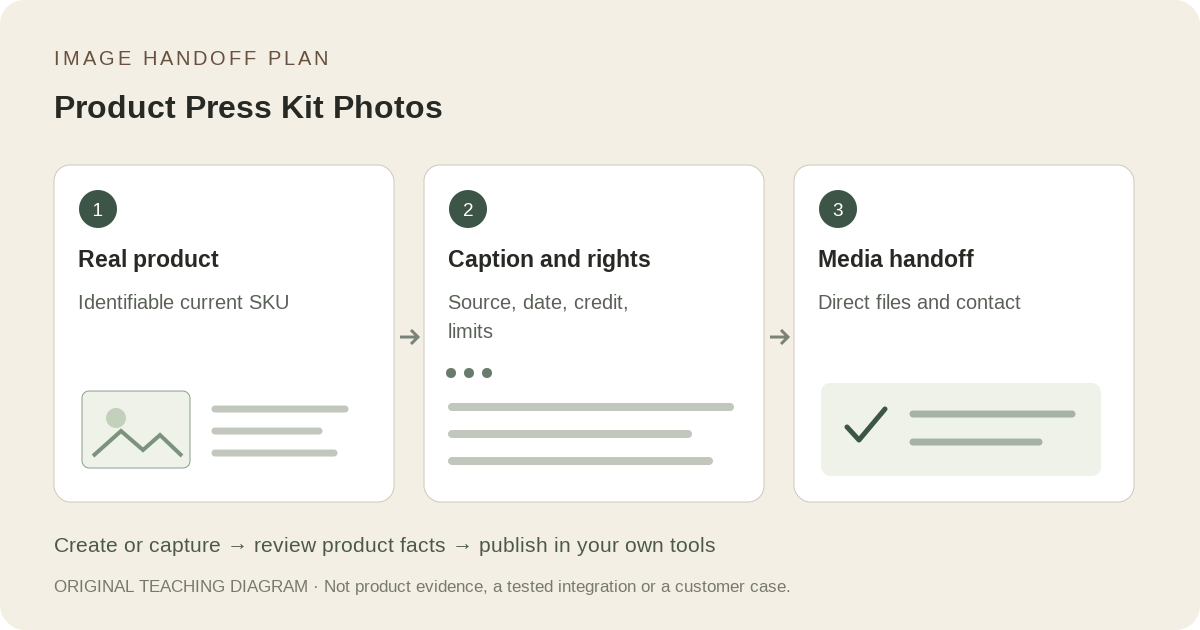
Original illustrative workflow: Real product, Caption and rights, Media handoff
EDITORIAL CONCEPT
01 / EXAMPLEILLUSTRATIVE CONCEPT
What this shows

Give each image a specific delivery job.

This illustrative workflow separates image creation from the checks and publishing steps you complete in your own tools. The sequence is a planning aid, not a tested integration or evidence of listing approval.

Original illustrative workflow: Real product, Caption and rights, Media handoff
Editorial conceptOriginal teaching diagram, not a product photograph, Fayvoro result, platform screenshot or customer case.

This image is an editorial concept made for the site. It is not a Fayvoro generation or customer result. AI can change product shape, color, packaging, labels, and text. Check every important detail against the real item.

YOUR STARTING IDEA

Take the direction. Make it your own.

Explore an optional editorial setting around my actual product photo. Keep the product unobscured and leave room for the editor to crop. Do not add a publication logo, endorsement, quote, award or person. I will label any approved scene as generated illustration.
Add your reference photo in the studio, then adjust the direction.
Before you publish

Compare the result with your real product and your destination’s requirements.

  • Current product and any prototype are labeled accurately.
  • Each file has subject, source, date, credit and usage notes.
  • Illustrations are separate from real product evidence.
  • Download files and contact route work for an outside recipient.
02 / A PRACTICAL WORKFLOWSTART WITH YOUR PHOTO
01

Separate news evidence from illustrative mood

Use real product photographs for the item being launched, supplied components and anything the story will claim. Put concepts in a separate labeled folder. Shopify’s press-kit guide recommends accessible high-resolution product and brand assets; that does not make every styled image a factual photograph.

02

Create a caption record for every file

Keep filename, product name or identifier, view, production date, image source, photographer credit and approved usage in a small manifest. If the photograph shows a prototype, sample or unavailable color, say so. Avoid a caption such as “our bestselling product” unless the business has evidence for that claim.

  • Suggested caption fields: subject, status, date, source and credit.
  • Suggested delivery fields: original file, web copy, permitted uses and contact.
03

Explore an optional illustration with an explicit label

Fayvoro can help test a mood or setting from a reference photo, but it does not verify press rights, credentials or factual captions. If you include an approved generated scene, identify the method in its caption and retain a real current-product photo alongside it. Do not imply customer adoption or endorsement from a generated person or setting.

04

Test the handoff as a recipient

Open the media download route without your internal account and check that filenames and captions remain understandable. Supply a contact for image questions and an original suitable for the editor’s intended use. Let the editor choose the final crop; do not bake press quotes or a publication logo into the product photograph.

Common questions

A few things to know.

Can a generated setting be called a press photograph?

Use a truthful caption describing how it was made. Do not imply that an imagined setting or prototype was photographed as a real event or stocked item.

Does Fayvoro create a finished media kit?

No. Prepare image files here if useful, then assemble captions, rights and downloads in your own press-kit workflow.

Can I use another brand’s logo in a concept?

Do not add logos, publication endorsements or rights claims you are not authorized to use. Verify source-photo permission separately.

Make your image with intention.