All product image guides Product clipping path

Match the edge method to the deliverable.

A vector clipping path, a soft transparency mask and a finished background are different deliverables. Decide what the next editor or layout application needs before paying for or producing an isolation job.

Explore one secondary product scene Two free credits when you sign up. Review the result before publishing.
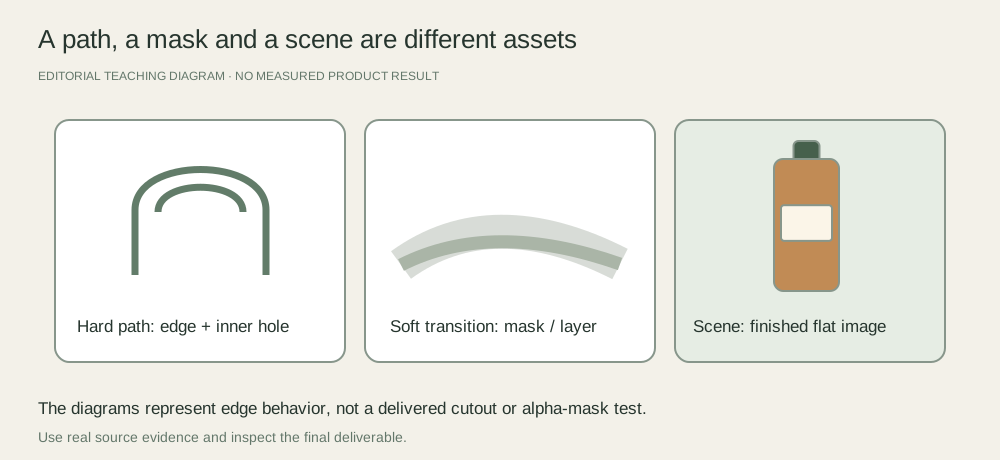
Defined product edges and interior handle holes lead to a hard path; soft material and shadows lead to a soft mask; a scene is a separate finished image
EDITORIAL CONCEPT
01 / EXAMPLEILLUSTRATIVE CONCEPT
What this shows

Hard outlines and soft transitions need different treatment.

The illustrated handles and shadow are teaching shapes. No cutout, alpha mask or Fayvoro background-removal result is shown.

Defined product edges and interior handle holes lead to a hard path; soft material and shadows lead to a soft mask; a scene is a separate finished image
Editorial conceptOriginal teaching diagram. It is not a generated product image, a customer example, or a measured test result.

This image is an editorial concept made for the site. It is not a Fayvoro generation or customer result. AI can change product shape, color, packaging, labels, and text. Check every important detail against the real item.

02 / A PRACTICAL WORKFLOWSTART WITH YOUR PHOTO
01

Confirm the receiving application and format

Ask whether the recipient needs an embedded path, a layered document, a transparent raster file or a flattened composition. Adobe describes clipping paths as vector boundaries for image placement, especially where a layout or print system needs them. A JPEG that appears isolated against white is not the same as a reusable transparent layer.

Keep a real source large enough to judge the outline. Identify the product exterior and interior openings such as a bag handle or ring. Specify whether separate elements require separate paths, and supply a preview of the intended use.

White on White Product Photography — Plan white product photographs with controlled background brightness, readable contours and preserved surface detail.

02

Separate defined edges from soft material

A bottle silhouette or rigid box often has a defined boundary. Hair, fringe, translucent material and feathered shadows require a different treatment. Adobe notes that clipping paths retain hard edges rather than feathered transitions; a soft transparency mask can be more appropriate for those areas.

Do not cut away transparent glass as if it were an empty hole. Keep reflections and transmission that belong to the product and ask for a product-specific test. If the source does not distinguish the edge from the background, a clearer reshoot may be the better starting point.

03

Review the path where it will be used

Inspect curves for flat spots, clipped corners, retained background slivers and lost holes. Place the delivered asset in the actual target application, over both a light and dark test background when applicable. Check the print or export workflow if that is the final job; a preview in another editor is not conclusive.

Fayvoro does not deliver an embedded clipping path, editable mask or guaranteed transparent cutout. It makes finished scene candidates. Choose the scene CTA only after deciding that a new contextual image is useful alongside the isolation deliverable.
Practical decision worksheet

Specify the isolation deliverable

Confirm the receiving application with the person who will place or print the file.

Need or findingNext actionEvidence to check
Rigid defined outlineConsider a vector path where the handoff needs one.Curves, corners and interior holes remain correct.
Fringe or soft fabric edgeDiscuss a soft transparency mask rather than a hard path.Fine material is not clipped into a rigid silhouette.
Glass or translucent packagingRetain product transmission and reflection in a tested treatment.Transparent material is not mistaken for empty background.
Finished scene for a campaignDeliver a reviewed flat image instead of claiming a reusable path.The recipient understands the different deliverable.

Use the worksheet in your existing capture, editing or storefront workflow. Fayvoro’s scene studio is a separate optional step and does not perform the editing or platform actions described here.

Direction to try

A useful starting note.

Use this as a starting point, then adjust it for your own product. No prompt can guarantee exact product details.

Use my reviewed real product reference to explore one finished secondary scene. Keep the whole outline visible. This is a separate creative image; my clipping path or transparent layer will be prepared and checked in an appropriate editor.
Before you publish

Check the details.

  • Receiving application and deliverable format are agreed.
  • Interior holes and separate elements are explicitly included.
  • Soft edges and translucent material have an appropriate treatment.
  • The delivered file is tested in its actual layout, export or print workflow.
Common questions

A few things to know.

Is a clipping path the same as removing the background?

It is one isolation method with a hard vector boundary. A soft raster mask or flattened white-background image behaves differently and may suit a different handoff.

Can it retain a soft shadow?

A hard clipping path does not preserve a feathered transition. Discuss a separate shadow layer or soft transparency treatment with the editor.

Will Fayvoro export a Photoshop path?

No. The current studio generates finished images rather than reusable clipping paths or editable masks.

Make your image
with intention.

Explore one secondary product scene