Upload a portrait and describe your graduation-inspired look. Generate a celebratory concept with academic attire, a chosen backdrop, and room for a personal announcement layout.
JPG, PNG or WebP · Up to 10 MB
Review the prompt and credit cost in the studio before generating.
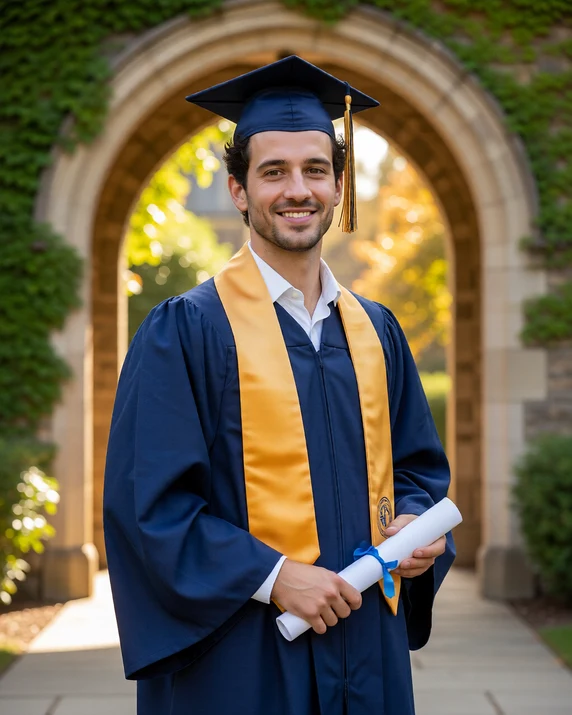
An AI-created edit of the fictional reference shown here. Compare the face, structure and details before using your own result.
A FEW WAYS IN
Explore the example. Make it yours.
Open a prompt to see the starting idea. You choose when to generate.
AI INSPIRATION
REFERENCE
The graduation moment, in color
An AI-created edit of the fictional reference shown here. Compare the face, structure and details before using your own result.
Explore the prompt
Create a celebratory graduation portrait of the adult person in the reference. Preserve their recognizable face, hair and adult age. Show them standing in a navy academic gown, vivid gold stole and mortarboard with tassel, holding a closed unlettered diploma tube at their waist. Warm confident smile and relaxed three-quarter pose. Sunlit stone campus arch, green foliage and golden bokeh. Natural skin and realistic hands. No school logos, lettering or extra people.
MAKE IT MORE YOURS
A little intention. A different image.
01
Leave room for the cap and shoulders
A clear portrait with some space above the head gives a graduation concept room for a mortarboard. Avoid a tight crop that already cuts through the hair. Visible shoulders also help you judge the academic gown and collar. Start with a current photo you are comfortable using as a reference, and decide whether you want a close portrait or a wider celebratory composition before adding background details.
02
Describe the attire without inventing credentials
Choose the gown color, cap shape, and overall formality, then select a quiet campus-like background or a simple studio setting. If school-specific details matter, check them yourself rather than expecting the generator to infer a correct hood, stole, or tassel. Keeping logos and degree wording out of the artwork avoids distracting errors. You can add accurate announcement text separately in a layout you control.
03
Check the portrait and the academic details
Compare the face with your source image and inspect the cap angle, tassel, hairline, gown folds, and any visible hands. Make sure the clothing looks coherent instead of merely ceremonial at a glance. The result is a graduation-inspired image concept, not proof of enrollment, attendance, or a qualification. Before printing an announcement, review every visual detail and confirm the downloaded dimensions are suitable for the intended layout and print size.
BEFORE YOU BEGIN
A few useful answers.
Can I choose gown or school colors?+
Describe the colors you want. Exact institutional attire, hood details, and school branding are not guaranteed and should be checked against your own references.
Can it add accurate diploma text?+
Do not rely on generated text for credentials or names. Leave text out of the image and add accurate announcement wording separately.
What source photo leaves room for a cap?+
Choose a clear portrait with space above the hair and visible shoulders. A very tight face crop gives less room to assess the cap and gown.
Is this a real graduation photograph?+
It is a generated graduation-inspired portrait concept. It should not be used as evidence of a ceremony, institution, or qualification.